Learn how to install Firebird Database Server on CentOS 8 with our step-by-step guide. Ensure a secure and efficient setup for your database needs on CentOS 8. #centlinux #linux #firebird
Table of Contents
What is Firebird Database?
Firebird is an open-source relational database management system (RDBMS) known for its high performance, scalability, and reliability. It is based on the InterBase database engine and has been actively developed since 2000. Firebird supports SQL-92 standard queries and provides advanced features such as:
- Multi-Version Concurrency Control (MVCC): Ensures consistent transaction handling without locking issues.
- Stored Procedures and Triggers: Allows complex business logic to be executed at the database level.
- Full ACID Compliance: Guarantees data integrity through atomicity, consistency, isolation, and durability.
- Cross-Platform Support: Runs on Linux, Windows, macOS, and other Unix-based systems.
- Lightweight and Embedded Mode: Can operate as an embedded database, eliminating the need for a dedicated database server.
- Remote and Local Access: Supports TCP/IP connections for remote clients while also allowing local access.
- Low Resource Consumption: Efficiently handles small to medium-sized databases with minimal system requirements.
Firebird is widely used in enterprise applications, point-of-sale (POS) systems, accounting software, and embedded solutions due to its flexibility, security, and cost-effectiveness.
Firebird Database Features
Some of the notable features of FireBird database are:
- Full support for stored procedures and triggers
- Referential integrity
- Full ACID compliant transactions
- Support for External Functions
- Careful writes – fast recovery, no need for transaction logs
- Incremental backups
- Full cursor implementation in PSQL
- Third-party tools, including GUI administrative tools and replication tools
Linux Server Specification
We are utilizing a KVM-based CentOS 8 virtual machine, which provides robust virtualization capabilities with excellent performance and isolation. This virtual machine is configured with the following specifications, ensuring optimal efficiency and stability for our deployment environment.
- CPU – 3.4 Ghz (2 cores)
- Memory – 2 GB
- Storage – 20 GB
- Operating System – CentOS Linux 8.1
- Hostname – firebird-02.centlinux.com
- IP Address – 192.168.116.206 /24
For experimenting with the Firebird Database Server on CentOS 8, it’s highly recommended to use a dedicated environment to avoid conflicts and ensure optimal performance.
A Mini PC offers a compact, cost-effective hardware solution that runs Linux servers efficiently—perfect for hands-on testing and development. Alternatively, a reliable VPS service like Bluehost provides scalable resources and easy remote access, making it ideal for flexible server experimentation without hardware setup.
Both options are excellent for practicing Linux administration and database management in a controlled environment.
If you’re interested, you can find recommended Mini PCs and Bluehost VPS plans through the affiliate links below. As an affiliate, I may earn a small commission at no extra cost to you, which helps support this blog.
[Start Your DevOps Lab with a Mini PC – Order Today!]
[Try Bluehost VPS Now – Perfect for Linux & DevOps Enthusiasts!]
Update Linux Software Packages
To establish a secure connection with the Firebird database server, access the KVM-based CentOS 8 virtual machine named firebird-02.centlinux.com as the root user. Use an SSH client such as OpenSSH (Linux/macOS) or PuTTY (Windows) to remotely connect to the server.
Once connected, ensure that the system is up to date by executing the following command, which updates all installed software packages and dependencies using the DNF package manager:
dnf update -yThis step is essential for maintaining system security, stability, and compatibility with the latest software releases.
Install LibTomMath on CentOS 8
Firebird database requires LibTomMath library, a free open source portable number theoretic multiple-precision integer library.
LibTomMath package is not available in standard yum repositories. Therefore, we need to install the EPEL (Extra Packages for Enterprise Linux) first.
dnf install epel-release -yBuild cache for EPEL and other yum repositories.
dnf makecacheOutput:
CentOS-8 - AppStream                            4.0 kB/s | 4.3 kB     00:01
CentOS-8 - Base                                 3.3 kB/s | 3.9 kB     00:01
CentOS-8 - Extras                               1.7 kB/s | 1.5 kB     00:00
Extra Packages for Enterprise Linux Modular 8 - 4.1 kB/s | 6.6 kB     00:01
Extra Packages for Enterprise Linux 8 - x86_64  5.5 kB/s | 6.7 kB     00:01
Metadata cache created.
We can now install LibTomMath library from EPEL repository by using dnf command.
dnf install -y libtommathInstall Firebird Database Server on CentOS 8
At the time of this writing, Firebird 3.0.5 is the latest stable release, offering enhanced performance, security improvements, and bug fixes. Firebird is a cross-platform relational database management system (RDBMS), and its official downloads are available for multiple operating systems, including Linux, Windows, and macOS.
To obtain the appropriate installation package for your system, visit the official Firebird download page. Here, you can find versions tailored for different platforms, including server, embedded, and development editions. Ensure that you select the correct version based on your operating system and deployment requirements.
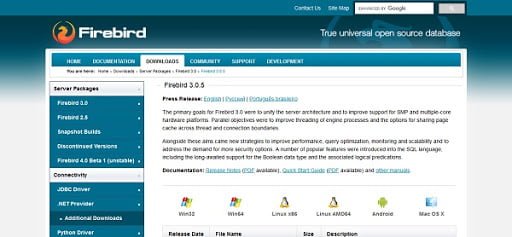
Copy the link of the Firebird compressed tarball and download it by using wget command.
wget https://github.com/FirebirdSQL/firebird/releases/download/R3_0_5/Firebird-3.0.5.33220-0.amd64.tar.gzExtract downloaded tarball using tar command to install Firebird on Linux..
tar xf Firebird-3.0.5.33220-0.amd64.tar.gzWe can install Firebird database by using install.sh script. But during Firebird installation, we have encountered following errors.
/opt/firebird/bin/gsec: error while loading shared libraries: libtommath.so.0: cannot open shared object file: No such file or directory
and
/opt/firebird/bin/gsec: error while loading shared libraries: libncurses.so.5: cannot open shared object file: No such file or directory
The reason behind the above errors is that the Firebird is looking for older versions of these libraries, while in CentOS 8 the new versions of these libraries has been installed.
To overcome these issues, we simply create the softlinks to the new version of these shared libraries.
ln -s /usr/lib64/libtommath.so.1.1.0 /usr/lib64/libtommath.so.0
ln -s /usr/lib64/libncurses.so.6.1 /usr/lib64/libncurses.so.5
Now, go to Firebird setup directory and start installation.
cd Firebird-3.0.5.33220-0.amd64/
./install.sh
Output:
Firebird 3.0.5.33220-0.amd64 Installation

Press Enter to start installation or ^C to abort
Extracting install data
Updated /etc/services
Please enter new password for SYSDBA user: Str0ngPa55word
Install completed
Installer creates a systemd service for Firebird database. The Firebird database engine is run in Superserver mode by default. However, you can customize it by using /etc/firebird/firebird.conf configuration file.
Check the status of the Firebird database service.
systemctl status firebird-superserver.serviceOutput:
â firebird-superserver.service - Firebird Database Server ( SuperServer )
   Loaded: loaded (/usr/lib/systemd/system/firebird-superserver.service; enabl>
   Active: active (running) since Mon 2020-05-11 02:07:57 PKT; 2min 21s ago
  Process: 27710 ExecStart=/opt/firebird/bin/fbguard -pidfile /var/run/firebir>
 Main PID: 27712 (firebird)
    Tasks: 4 (limit: 5916)
   Memory: 2.0M
   CGroup: /system.slice/firebird-superserver.service
           ââ27711 /opt/firebird/bin/fbguard -pidfile /var/run/firebird/firebi>
           ââ27712 /opt/firebird/bin/firebird

May 11 02:07:57 firebird-02.centlinux.com systemd[1]: Starting Firebird Databa>
May 11 02:07:57 firebird-02.centlinux.com systemd[1]: firebird-superserver.ser>
May 11 02:07:57 firebird-02.centlinux.com systemd[1]: firebird-superserver.ser>
May 11 02:07:57 firebird-02.centlinux.com systemd[1]: Started Firebird Databas>
Installer does not include the Firebird binaries directory in the PATH environmental variable. We need to do it by ourselves.
Edit .bash_profile of root user.
cd
vi ~/.bash_profile
Locate PATH variable and update it as follows.
PATH=$PATH:$HOME/bin:/opt/firebird/bin/Save and exit.
We need to execute .bash_profile once, to update PATH environment variable for current session.
source ~/.bash_profileCheck version of Firebird database.
firebird -zOutput:
Firebird TCP/IP server version LI-V3.0.5.33220 Firebird 3.0
If you are planning to access your FireBird database server across the network, then you have to enable the FireBird default service port in Linux firewall.
firewall-cmd --permanent --add-port=3050/tcp
firewall-cmd --reload
We have successfully install Firebird on Linux server.
Basic Firebird SQL Commands
Connect to sample Firebird database i.e. employee by using isql command as sysdba user.
isql -u sysdba -p Str0ngPa55word employeeOutput:
Database: employee, User: SYSDBA
SQL>
We can list database users by using following command.
show users;Output:
Users in the database
  1 #SYSDBA
Currently, we have only one user in the database, that is why the command provided a single user list.
Check the version of iSQL and Firebird database.
show version;Output:
ISQL Version: LI-V3.0.5.33220 Firebird 3.0
Server version:
Firebird/Linux/AMD/Intel/x64 (access method), version "LI-V3.0.5.33220 Firebird 3.0"
on disk structure version 12.0
List down the tables in the employee database.
show tables;Output:
       COUNTRY                                CUSTOMER
       DEPARTMENT                             EMPLOYEE
       EMPLOYEE_PROJECT                       JOB
       PROJECT                                PROJ_DEPT_BUDGET
       SALARY_HISTORY                         SALES
Query data from COUNTRY table by using SELECT statement.
select * from country;Output:
COUNTRY         CURRENCY
=============== ==========
USA             Dollar
England         Pound
Canada          CdnDlr
Switzerland     SFranc
Japan           Yen
Italy           Euro
France          Euro
Germany         Euro
Australia       ADollar
Hong Kong       HKDollar
Netherlands     Euro
Belgium         Euro
Austria         Euro
Fiji            FDollar
Russia          Ruble
Romania         RLeu
Our CentOS 8 based Firebird database server is working fine.
Frequently Asked Questions (FAQs)
Where is the default Firebird database directory?
The default database directory is: /var/lib/firebird/.
What is the default Firebird admin user and password?
The default user is SYSDBA, and the password is set during installation (or found in /etc/firebird/SYSDBA.password).
How does Firebird handle database storage on CentOS 8?
Firebird stores databases in the /var/lib/firebird/ directory by default, using a single-file database architecture for efficient access.
What authentication method does Firebird use?
Firebird uses its own authentication system with user credentials stored in security2.fdb. The default administrator account is SYSDBA.
How does Firebird manage network connections?
Firebird communicates over TCP/IP using port 3050 by default. Remote access requires proper firewall and security configurations.
Final Thoughts
In conclusion, installing Firebird Database Server on CentOS 8 can greatly enhance your data management capabilities with its robust performance and flexibility. Whether you’re setting up a new database or migrating an existing one, Firebird offers the features and reliability you need for your applications.
Optimize your cloud infrastructure and secure your servers with my AWS and Linux administration services. Let’s ensure your systems run smoothly. Connect with me now! if you need any guidance or advice related to your Linux VPS.
Thank you for considering my service, and I look forward to helping you achieve a seamless database setup!
Recommended Courses
Boost your Linux skills with the “Linux Command Line Basics” by Ahmed Alkabary—a perfect course for beginners who want to master the command line efficiently. Whether you’re aiming for a career in system administration, DevOps, or just want to manage your Linux systems like a pro, this course covers everything from essential commands to practical exercises.
Start learning at your own pace and transform the way you interact with Linux today. [Enroll here] to get started instantly!
Disclaimer: This post contains affiliate links. If you purchase through these links, I may earn a small commission at no extra cost to you. Your support helps me continue sharing helpful tech content.