
Learn how to install Ruby on Rails on Rocky Linux 9 with our comprehensive guide. Get step-by-step instructions to set up your development environment efficiently. #centlinux #ruby #linux
Table of Contents
What is Ruby on Rails?
Ruby on Rails, commonly known as Rails, is an open-source web application framework written in Ruby. It was created by David Heinemeier Hansson and released in 2004, gaining popularity due to its simplicity and convention-over-configuration approach. Rails follows the Model-View-Controller (MVC) architectural pattern, which separates the application logic into three main components: the model, view, and controller.
Here’s a brief overview of each component in Ruby on Rails:
Model
The model represents the data and business logic of the application. It defines the structure and behavior of the data, including how it is stored, validated, and manipulated. Ruby on Rails uses an object-relational mapping (ORM) called ActiveRecord, which provides an abstraction layer for interacting with the database. With ActiveRecord, developers can define models as Ruby classes and perform database operations using simple methods and conventions.
View
The view is responsible for presenting the application’s user interface. In Rails, views are typically written using Embedded Ruby (ERb), which allows mixing Ruby code with HTML to generate dynamic content. Views display data to the user and handle user interactions by sending requests to the controller.
Controller
The controller receives requests from the user, processes them, and determines the appropriate response. It acts as an intermediary between the model and the view, handling user input, performing business logic, and deciding which view to render. Controllers are implemented as Ruby classes, and they contain methods called actions, which are triggered by specific routes defined in the application.
Ruby on Rails Architecture
Ruby on Rails architecture promotes several conventions and principles that aim to enhance developer productivity and code maintainability:
Convention over Configuration
Rails follows a “convention over configuration” approach, which means it provides sensible defaults and makes assumptions based on naming conventions. By following these conventions, developers can minimize the amount of configuration needed, allowing them to focus on writing application code.
DRY (Don’t Repeat Yourself)
Rails emphasizes code reuse and reducing duplication. It provides features such as code generators and scaffolding to generate common code patterns automatically, making it easier to build applications quickly.
RESTful Architecture
Rails encourages building applications that adhere to the principles of Representational State Transfer (REST). RESTful routing conventions make it easier to define and manage application routes and resources, providing a consistent and intuitive way to design APIs.
Gems and Plugins
Ruby on Rails has a vibrant ecosystem of community-contributed libraries, called gems, which extend the framework’s functionality. Developers can easily integrate gems into their applications, leveraging existing solutions for various tasks.
Ruby on Rails has been widely adopted by developers due to its productivity, community support, and ease of use. It has been used to build numerous high-profile websites and applications, showcasing its scalability and robustness.
If you’re serious about mastering web development, The Complete Ruby on Rails Developer Course by Rob Percival and Mashrur Hossain is one of the best investments you can make. This highly rated course takes you from beginner to professional developer, covering everything from Ruby fundamentals to building full-featured web applications with Rails.
Whether you’re aiming to land your first job in tech, upgrade your coding skills, or launch your own startup, this course provides the practical knowledge and real-world projects you need to succeed.
Disclaimer: This post contains affiliate links. If you purchase through these links, I may earn a small commission at no extra cost to you. This helps support my blog and allows me to keep creating useful content for readers like you.
Ruby on Rails vs Javascript
Comparing Ruby on Rails to JavaScript is akin to comparing apples and oranges because they serve different purposes within web development.
Ruby on Rails is a full-stack web application framework written in Ruby, focusing on convention over configuration and emphasizing productivity and developer happiness. It provides a structured environment for building robust, database-driven web applications efficiently.
JavaScript, on the other hand, is a versatile programming language commonly used for client-side scripting in web development. It’s primarily utilized for enhancing user interactivity and dynamic content on web pages. Additionally, with the rise of Node.js, JavaScript can also be used on the server-side for building scalable and high-performance applications.
While Ruby on Rails is focused on server-side development, JavaScript plays a crucial role in both client-side and server-side development, offering a wide range of frameworks and libraries such as React.js, AngularJS, and Vue.js for building interactive user interfaces and Node.js for server-side applications.
In summary, Ruby on Rails and JavaScript are not direct competitors but rather complementary technologies used for different aspects of web development. The choice between them depends on the specific requirements and preferences of a project, with many developers often using both in conjunction to create modern, feature-rich web applications.
Environment Specification
We are using a minimal installed Rocky Linux 9 virtual machine with following specifications.
- CPU – 3.4 Ghz (2 cores)
- Memory – 4 GB
- Storage – 40 GB
- Operating System – Rocky Linux release 9.2 (Blue Onyx)
- Hostname – rails-01.centlinux.com
- IP Address – 192.168.116.133/24
For a smooth Ruby on Rails setup on Rocky Linux 9, it’s important to have a reliable environment. If you prefer building your own home lab, a Mini PC is an excellent choice — compact, powerful, and energy-efficient for running Linux-based development servers locally. [Check our recommended Mini PC at Amazon]
On the other hand, if you want a ready-to-use cloud environment, a Bluehost VPS gives you scalable resources, high availability, and the flexibility to experiment with Rails projects without maintaining hardware. Both options provide a strong foundation for learning, testing, and deploying modern web applications. [Shop for a BlueHost VPS Now!]
Disclosure: Some of the links in this section are affiliate links. This means I may earn a small commission if you purchase through them, at no extra cost to you. It helps support my work and the free tutorials I share.
Prepare your Rocky Linux Server
By using a ssh client, login to your Rocky Linux server as root user.
Set a Fully Qualified Domain Name (FQDN) for your Linux server and configure Local DNS resolution thereon.
hostnamectl set-hostname rails-01.centlinux.com
echo "192.168.116.133 rails-01 rails-01.centlinux.com" >> /etc/hosts
Execute dnf command to update software packages in your Linux OS.
dnf update -ySometimes, the above command also installs a latest version of Linux Kernel on your operating system.
If this happens, then you should reboot your Linux server before installing Ruby on Rails software.
rebootNote down the versions of Linux OS and Kernel, that are being used in this tutorial.
cat /etc/rocky-release
uname -r
Output:
Rocky Linux release 9.2 (Blue Onyx)
5.14.0-284.11.1.el9_2.x86_64
Install Ruby on Rails Prerequisites
Ruby 3.0 is available in standard yum repositories of Rocky Linux 9. Therefore, you can easily install it by using dnf command.
dnf install -y ruby ruby-develAfter successful installation, check the version of ruby command.
ruby --versionRuby on Rails requires SQLite database support. You can install any available version of SQLite from standard yum repositories.
dnf install -y sqliteAfter installation, check the version of SQLite database software.
sqlite3 --versionSome of the prerequisites are not available in standard yum repositories, therefore, you need to install Power Tools (CRB) and EPEL yum repositories.
Execute following commands to install EPEL and Power Tools (CRB) yum repositories.
dnf install -y epel-release
/usr/bin/crb enable
Following prerequisites are required by Ruby on Rails software. You can install these prerequisites by using dnf command.
dnf install -y gcc git zlib-devel readline readline-devel rubygem-psych openssl-devel libffi libffi-devel ncurses ncurses-devel libyaml libyaml-develInstall Ruby on Rails Server
Ruby on Rails server can be installed as a Ruby Gem with the help of gem command.
Execute following commands to update installed gems and install Ruby on Rails in Rocky Linux 9 machine.
gem update
gem install rails
Verify Rails installation by querying the version with rails command.
rails --versionConfigure Linux Firewall
Ruby on Rails server uses default service port 3000/tcp. Therefore, you need to allow port in Linux firewall.
Execute following command at Linux bash prompt to permanently allow service port 3000/tcp in Linux firewall.
firewall-cmd --permanent --add-port=3000/tcp
firewall-cmd --reload
Ruby on Rails Example: Deploy a Ruby App
Running Ruby on Rails server as root user is not recommended. Therefore, you need to add a standard Linux user to deploy and run your Ruby applications.
Run following set of commands at Linux bash prompt to add a user and set necessary permissions on directories.
adduser apps
chown -R apps.apps /usr/share/gems/
chown -R apps.apps /usr/lib64/gems/
chmod o+w /usr/bin
Switch to apps user by invoking su command.
su - appsCreate a new Ruby App skeleton in /home/apps/blog directory.
cd
rails new blog
Install all required gems, that are listed in /home/apps/blog/Gemfile file.
bundle install --gemfile /home/apps/blog/GemfileStart Rails server on all network interfaces.
cd ~/blog
rails server -b 0.0.0.0
Output:
=> Booting Puma
=> Rails 7.0.6 application starting in development
=> Run `bin/rails server --help` for more startup options
Puma starting in single mode...
* Puma version: 5.6.6 (ruby 3.0.4-p208) ("Birdie's Version")
*  Min threads: 5
*  Max threads: 5
*  Environment: development
*          PID: 2192
* Listening on http://0.0.0.0:3000
Use Ctrl-C to stop
Open URL http://rails-01.centlinux.com:3000 in a web browser.
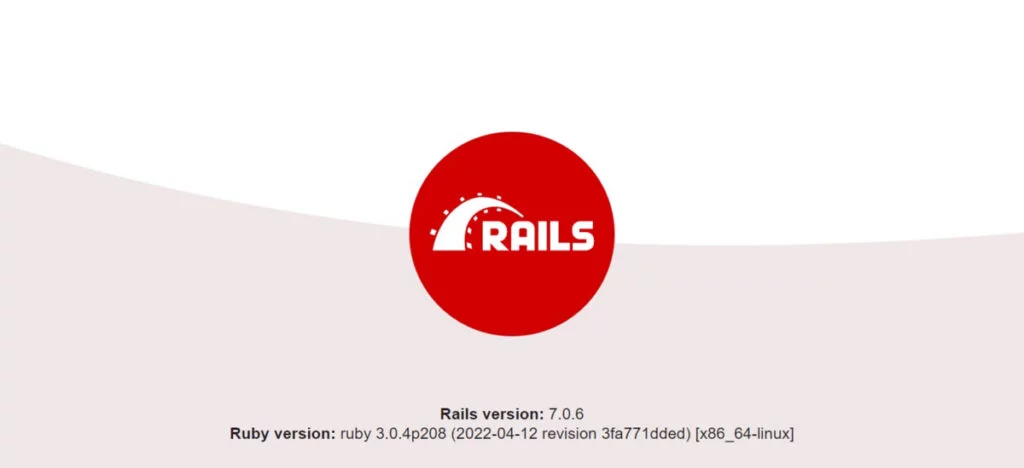
You can now see the default homepage of your Ruby App.
Revoke following permissions from other users, because it is no longer required.
chmod o-w /usr/binVideo Tutorial
Conclusion
Navigating through above process to install Ruby on Rails in Rocky Linux 9 can initially seem daunting, but with the right guidance, it becomes a straightforward endeavor. By following our comprehensive guide, you can efficiently set up your development environment and leverage the full potential of this robust web application framework. Embrace the journey of learning and discovery as you delve into the world of Ruby on Rails development on Rocky Linux 9.
Need a dependable Linux system administrator? I specialize in managing, optimizing, and securing Linux servers to keep your operations running flawlessly. Check out my services!
Frequently Asked Questions (FAQs)
1. Can I install multiple Ruby versions alongside Ruby on Rails on Rocky Linux 9?
Yes, using version managers like RVM or rbenv, you can install and switch between multiple Ruby versions without conflict while running Rails projects.
2. Is it necessary to install Node.js when setting up Ruby on Rails on Rocky Linux 9?
Yes, Node.js is required because Rails uses it to compile JavaScript assets during development and production.
3. How do I fix the “Could not find a JavaScript runtime” error after installation?
This error occurs if Node.js or another JavaScript runtime is missing. Installing Node.js with dnf install nodejs resolves it.
4. Can I use SQLite instead of MySQL or PostgreSQL with Rails on Rocky Linux 9?
Yes, SQLite is the default database for Rails and works well for development or small projects, requiring no extra configuration.
5. How do I ensure Rails runs automatically after a system reboot on Rocky Linux 9?
You can configure a systemd service or use a process manager like Puma with systemd to keep Rails running continuously after reboot.







Leave a Reply
You must be logged in to post a comment.