
I’ve seen too many clusters fail because etcd was rushed or misconfigured—this guide shows exactly how to set up a production-ready 3-node etcd cluster with proven commands, clean configs, and real validation steps so you can avoid common pitfalls and build a stable backbone before downtime and data inconsistency hit your environment. #CentLinux #K8s #Linux
Table of Contents
Introduction
If you’re running Kubernetes in anything beyond a toy setup, your control plane is only as reliable as your datastore. That datastore is etcd. Treat it like a first-class component, not an afterthought.
A single-node etcd works—until it doesn’t. The moment you care about uptime, consistency, and recovery, you need a clustered setup. In this guide, you’ll build a 3-node etcd cluster the right way: predictable, fault-tolerant, and production-ready.
What is etcd?
etcd is a distributed, strongly consistent key-value store built on the Raft consensus algorithm. It’s designed for reliability, not raw speed. (etcd Official Website)
Core characteristics:
- Strong consistency (CP system) — no stale reads
- Distributed by design — data replicated across nodes
- Leader-based writes — one leader, multiple followers
- Simple API (gRPC/HTTP) — easy to integrate and automate
Think of etcd as the source of truth for your cluster state. If etcd is down or corrupted, your control plane is blind.
Role of etcd in Kubernetes
In Kubernetes, etcd is the backend database for everything that matters.
What lives in etcd:
- Cluster state (nodes, pods, services)
- Configuration (ConfigMaps, Secrets)
- Scheduling data
- Leader election metadata
How it fits:
- kube-apiserver → etcd (read/write all state)
- Controllers and schedulers interact indirectly via the API server
- No etcd = no cluster state = no scheduling decisions
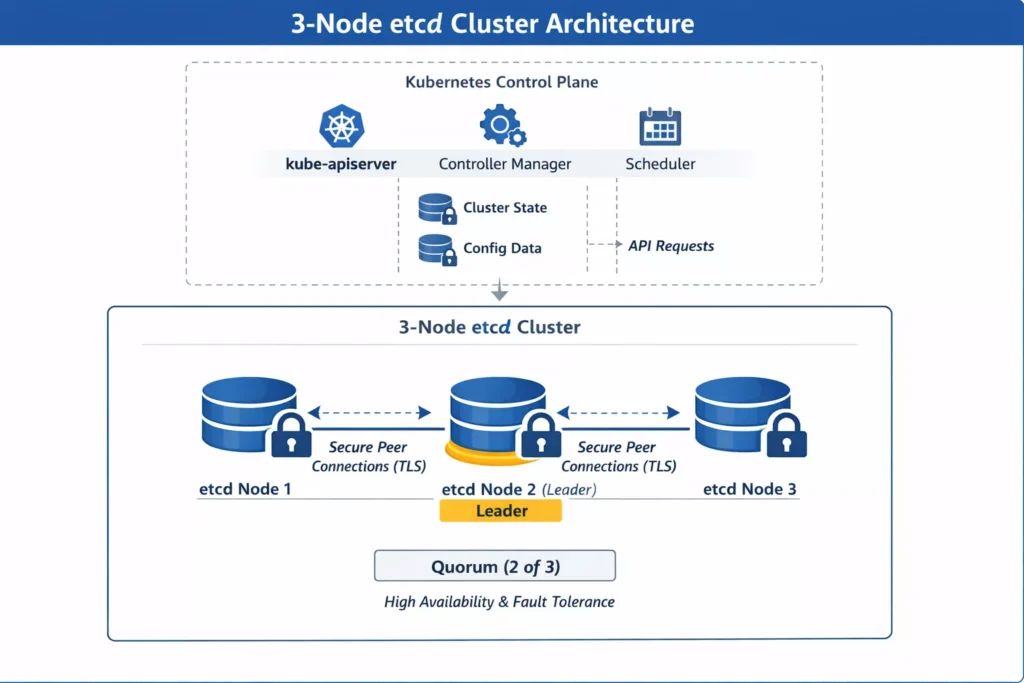
Bottom line: etcd is not “part of Kubernetes”—it’s the foundation Kubernetes stands on. (Kubernetes Official Website)
Why configure a 3-node etcd cluster
Running etcd as a cluster is about survivability, not scale.
Why 3 nodes specifically:
- Quorum-based consensus — requires majority (2/3 nodes)
- Fault tolerance — can lose 1 node and stay operational
- Split-brain avoidance — Raft enforces a single leader
What you gain:
- High availability for control plane state
- Safer upgrades and maintenance windows
- Better resilience against node or network failures
What you avoid:
- Single point of failure (1-node setup)
- Write unavailability during outages
- Risky manual recovery scenarios
When you actually need this
Don’t over-engineer, but don’t cut corners either.
Use a 3-node etcd cluster when:
- You’re running multi-node Kubernetes clusters
- You need production-grade uptime
- You care about data consistency and recovery
Skip clustering only if:
- You’re in a lab, dev box, or throwaway environment
What you’ll build
By the end of this guide, you’ll have:
- A 3-node etcd cluster with static peer configuration
- Secure communication (TLS-enabled if you follow best practices)
- Verified cluster health and quorum
- A setup ready to back a Kubernetes control plane
No hand-waving. Just a clean, working cluster you can rely on.
Read Also: Kubernetes Pod Tutorial for Beginners 2026
How to Set Up a 3-Node etcd Cluster (Production-Grade Walkthrough)
etcd is the backbone of distributed systems like Kubernetes. If it’s misconfigured, your control plane is dead on arrival. This guide walks through a clean, reproducible setup of a 3-node etcd cluster using systemd and TLS (optional but strongly recommended).
Prerequisites
Infrastructure
- 3 Linux nodes (Rocky Linux / Ubuntu / Debian)
- Static IPs and hostnames
Example:
node1: 192.168.1.10
node2: 192.168.1.11
node3: 192.168.1.12
Set hostnames:
sudo hostnamectl set-hostname node1
sudo hostnamectl set-hostname node2
sudo hostnamectl set-hostname node3
Update /etc/hosts on all nodes:
cat <<EOF | sudo tee -a /etc/hosts
192.168.1.10 node1
192.168.1.11 node2
192.168.1.12 node3
EOF
System Requirements
Allowed Ports:
2379(client)2380(peer)
Time sync enabled (chrony/ntpd):
For Debian based Linux Distros:
sudo apt install -y chrony
sudo systemctl enable --now chrony
For RHEL based Linux Distros:
sudo dnf install -y chrony
sudo systemctl enable --now chronyd
To enhance your Kubernetes etcd cluster’s reliability, consider investing in high-performance NVMe SSDs for optimal disk I/O, as etcd’s write-heavy operations demand fast storage to minimize latency and ensure cluster stability.
A top bestseller like the Samsung 990 PRO 2TB PCIe 4.0 NVMe SSD (ASIN: B0BHJJ9Y77) delivers exceptional read/write speeds up to 7,450/6,900 MB/s, making it ideal for production etcd nodes—pair it with “Kubernetes in Action, Second Edition” by Marko Lukša (ASIN: B07G3DDHZN), a highly rated guide praised for its deep dive into etcd internals and best practices, perfect for mastering setups like yours.
Disclaimer: As an Amazon Associate, I earn from qualifying purchases—this recommendation is based on current bestsellers relevant to DevOps pros.
Step 1 — Installing etcd
Download a stable release (example version):
ETCD_VERSION="v3.5.12"

wget https://github.com/etcd-io/etcd/releases/download/${ETCD_VERSION}/etcd-${ETCD_VERSION}-linux-amd64.tar.gz
tar -xvf etcd-${ETCD_VERSION}-linux-amd64.tar.gz
cd etcd-${ETCD_VERSION}-linux-amd64
Move binaries:
sudo mv etcd etcdctl /usr/local/bin/
chmod +x /usr/local/bin/etcd*
Verify:
etcd --version
etcdctl version
Step 2 — Creating Data Directory
Run on all nodes:
sudo mkdir -p /var/lib/etcd
sudo chown -R $(whoami):$(whoami) /var/lib/etcd
Step 3 — Defining Cluster Configuration
We’ll use static cluster bootstrap.
Cluster string (same on all nodes):
ETCD_INITIAL_CLUSTER="node1=http://192.168.1.10:2380,node2=http://192.168.1.11:2380,node3=http://192.168.1.12:2380"Step 4 — Creating systemd Service
Node 1
sudo tee /etc/systemd/system/etcd.service <<EOF
[Unit]
Description=etcd
Documentation=https://etcd.io
After=network.target

[Service]
ExecStart=/usr/local/bin/etcd \\
  --name node1 \\
  --data-dir /var/lib/etcd \\
  --initial-advertise-peer-urls http://192.168.1.10:2380 \\
  --listen-peer-urls http://192.168.1.10:2380 \\
  --listen-client-urls http://192.168.1.10:2379,http://127.0.0.1:2379 \\
  --advertise-client-urls http://192.168.1.10:2379 \\
  --initial-cluster ${ETCD_INITIAL_CLUSTER} \\
  --initial-cluster-state new \\
  --initial-cluster-token etcd-cluster-1
Restart=always
RestartSec=5
LimitNOFILE=40000

[Install]
WantedBy=multi-user.target
EOF
Read Also: Systemd vs Other Init Systems
Node 2
Change --name and IP:
--name node2
--initial-advertise-peer-urls http://192.168.1.11:2380
--listen-peer-urls http://192.168.1.11:2380
--listen-client-urls http://192.168.1.11:2379,http://127.0.0.1:2379
--advertise-client-urls http://192.168.1.11:2379
Node 3
Same pattern:
--name node3
--initial-advertise-peer-urls http://192.168.1.12:2380
--listen-peer-urls http://192.168.1.12:2380
--listen-client-urls http://192.168.1.12:2379,http://127.0.0.1:2379
--advertise-client-urls http://192.168.1.12:2379
Step 5 — Start etcd Cluster
Run on all nodes:
sudo systemctl daemon-reexec
sudo systemctl daemon-reload
sudo systemctl enable etcd
sudo systemctl start etcd
Check status:
sudo systemctl status etcdStep 6 — Verify Cluster Health
Set environment:
export ETCDCTL_API=3Check members:
etcdctl --endpoints=http://192.168.1.10:2379,http://192.168.1.11:2379,http://192.168.1.12:2379 member listExpected output:
- 3 members
- All in
startedstate
Check endpoint health:
etcdctl --endpoints=http://192.168.1.10:2379,http://192.168.1.11:2379,http://192.168.1.12:2379 endpoint healthCheck leader:
etcdctl --endpoints=http://192.168.1.10:2379 endpoint status --write-out=tableLook for:
- One leader
- Two followers
Step 7 — Test Read/Write
Write:
etcdctl --endpoints=http://192.168.1.10:2379 put testkey "cluster working"Read:
etcdctl --endpoints=http://192.168.1.11:2379 get testkeyIf data is consistent across nodes → replication is working.
Optional — Enable TLS (Recommended for Production)
Generate certs (quick example using openssl):
openssl genrsa -out ca.key 2048
openssl req -x509 -new -nodes -key ca.key -subj "/CN=etcd-ca" -days 3650 -out ca.crt
Generate server cert per node:
openssl genrsa -out server.key 2048

openssl req -new -key server.key -subj "/CN=node1" -out server.csr

openssl x509 -req -in server.csr -CA ca.crt -CAkey ca.key -CAcreateserial \
-out server.crt -days 3650 -extensions v3_req \
-extfile <(printf "[v3_req]\nsubjectAltName=IP:192.168.1.10,DNS:node1")
Update etcd service flags:
--cert-file=/etc/etcd/server.crt
--key-file=/etc/etcd/server.key
--client-cert-auth
--trusted-ca-file=/etc/etcd/ca.crt

--peer-cert-file=/etc/etcd/server.crt
--peer-key-file=/etc/etcd/server.key
--peer-client-cert-auth
--peer-trusted-ca-file=/etc/etcd/ca.crt
Troubleshooting
etcd won’t start
Check logs:
journalctl -u etcd -fCommon issues:
- Port already in use
- Wrong IP in flags
- Permission issues on
/var/lib/etcd
Cluster stuck in “unhealthy”
Check connectivity:
nc -zv 192.168.1.11 2380If blocked → fix firewall:
sudo firewall-cmd --add-port=2379/tcp --permanent
sudo firewall-cmd --add-port=2380/tcp --permanent
sudo firewall-cmd --reload
Split brain / no leader
Usually caused by:
- Incorrect
initial-clusterstring - Nodes started with mismatched configs
Fix:
- Stop all nodes
- Clear data dir:
sudo rm -rf /var/lib/etcd/* - Restart clean
Best Practices
- Always use odd number of nodes (3, 5, 7)
- Use dedicated disks (SSD) for
/var/lib/etcd - Enable TLS everywhere
- Monitor with:
etcdctl endpoint status --write-out=table - Backup regularly:
etcdctl snapshot save snapshot.db
Common Mistakes
- Using
localhostin cluster config (breaks multi-node) - Mixing
httpandhttps - Not syncing time (causes election issues)
- Forgetting
--initial-cluster-state newon first boot - Reusing old data dir with new cluster config
Real-World Usage Notes
- Kubernetes control plane depends entirely on etcd consistency
- Latency between nodes directly impacts cluster stability
- Treat etcd like a database, not just “another service”
Final Check
Run this before calling it done:
etcdctl endpoint health
etcdctl member list
etcdctl put sanity check
etcdctl get sanity
If all clean → your 3-node etcd cluster is production-ready.
Read Also: Kubectl Cheat Sheet for Kubernetes Admins
Conclusion
A 3-node etcd cluster is the minimum viable setup for a reliable control plane datastore. You get quorum, fault tolerance, and predictable behavior under failure—without unnecessary complexity.
The key takeaways:
- Odd-number clusters only — 3 nodes is the sweet spot
- Quorum is everything — lose majority, lose writes
- Latency matters — keep nodes close (same region/AZ if possible)
- Backups are non-negotiable — snapshots + tested restores
- TLS everywhere — client and peer traffic should be encrypted
If you wire this correctly, Kubernetes becomes stable by default. If you cut corners here, everything above it inherits that risk. Build it once, validate it properly, and you won’t have to think about it again until upgrade day.
FAQs
What is the minimum number of nodes required for an etcd cluster?
Minimum for fault tolerance is 3 nodes. A single node has no redundancy, and a 2-node cluster can’t maintain quorum during failure. With 3 nodes, you can lose 1 and still operate.
How do I check etcd cluster health from the command line?
Use etcdctl with the v3 API:
export ETCDCTL_API=3etcdctl \
--endpoints=https://node1:2379,https://node2:2379,https://node3:2379 \
--cacert=/etc/etcd/ca.crt \
--cert=/etc/etcd/client.crt \
--key=/etc/etcd/client.key \
endpoint health
For quorum and leader info:
etcdctl endpoint status --write-out=table
What happens if one etcd node fails in a 3-node cluster?
Nothing breaks immediately. The cluster still has 2/3 quorum, so reads and writes continue. You should replace or recover the failed node quickly—if a second node goes down, the cluster becomes read-only.
How often should I back up etcd data?
At minimum:
Before any upgrade or config change
Scheduled snapshots (e.g., every 6–12 hours for active clusters)
Example snapshot:
ETCDCTL_API=3 etcdctl snapshot save /backup/etcd-$(date +%F-%H%M).db \
--endpoints=https://127.0.0.1:2379 \
--cacert=/etc/etcd/ca.crt \
--cert=/etc/etcd/client.crt \
--key=/etc/etcd/client.key
And always test restore:
etcdctl snapshot restore snapshot.db
Backups you never restore are just wishful thinking.
Is it safe to run etcd on the same nodes as Kubernetes control plane?
Yes—this is the standard stacked topology used by kubeadm. It’s simpler and works well for most setups.
Use external etcd when:
– You want strict isolation of datastore
– You’re running large clusters or multiple control planes
– You need independent scaling and lifecycle management
For most production clusters, stacked etcd on 3 control plane nodes is a solid default.
Recommended Courses
If you’re eager to kickstart your journey into cloud-native technologies, “Kubernetes for the Absolute Beginners – Hands-on” by Mumshad Mannambeth is the perfect course for you. Designed for complete beginners, this course breaks down complex concepts into easy-to-follow, hands-on lessons that will get you comfortable deploying, managing, and scaling applications on Kubernetes.
Whether you’re a developer, sysadmin, or IT enthusiast, this course provides the practical skills needed to confidently work with Kubernetes in real-world scenarios. By enrolling through the links in this post, you also support this website at no extra cost to you.
Disclaimer: Some of the links in this post are affiliate links. This means I may earn a small commission if you make a purchase through these links, at no additional cost to you.
Leave a Reply
You must be logged in to post a comment.