
Discover how to install Jetty on CentOS 7 with our easy-to-follow guide. Get detailed instructions to set up and configure Jetty, ensuring a seamless installation process on your CentOS 7 system. #centlinux #linux #java
Table of Contents
What is Jetty Server?
Jetty is a Java HTTP web server and Java servlet container. Jetty is a free and open source project developed and maintained by Eclipse Foundation. Jetty is used in many open source projects and products. Jetty can be easily embedded in devices, tools, frameworks, application servers and clusters.
In this article, we will install Jetty on CentOS 7 and then deploy a Java web application on it.

Linux Server Specification
We have provisioned a CentOS 7 minimal install virtual machine with following specification, for Jetty 9 installation.
- Hostname – jetty-01.example.com
- IP Address – 192.168.116.166/24
- Operating System – CentOS 7.6
- Jetty version – Jetty 9.4
To ensure a smooth Jetty installation on CentOS 7, a reliable server environment is crucial. For hardware enthusiasts, the GMKtec Mini PC NucBox G5 offers powerful performance with robust Intel 12th Gen Alder Lake N97 processors perfect for handling Java-based applications like Jetty.
Additionally, the SanDisk Ultra 1TB SSD provides fast and dependable storage, significantly speeding up server response times and data handling. Both products are highly rated and popular among CentOS and server administrators aiming for stable and efficient setups.
Disclaimer: As an affiliate, purchases made through these links support this blog at no extra cost to you—thank you for your support.
Install OpenJDK on CentOS 7
Connect with jetty-01.example.com using ssh as root user.
Jetty requires JVM to execute Java web applications. Therefore we are installing OpenJDK using yum command.
yum install -y java-1.8.0-openjdkSet Java environment variables.
echo "export JAVA_HOME=/usr/lib/jvm/jre-1.8.0-openjdk-1.8.0.212.b04-0.el7_6.x86_64" >> /etc/profile
. /etc/profile
env | grep JAVA_HOME
JAVA_HOME=/usr/lib/jvm/jre-1.8.0-openjdk-1.8.0.212.b04-0.el7_6.x86_64
Ensure Java installation by checking the version.
java -versionOutput:
openjdk version "1.8.0_212"
OpenJDK Runtime Environment (build 1.8.0_212-b04)
OpenJDK 64-Bit Server VM (build 25.212-b04, mixed mode)
OpenJDK has been installed on CentOS 7.
Install Jetty on CentOS 7
Create a user to own Jetty software.
useradd jettyDownload latest version of Jetty from Eclipse website. Earlier releases can be download from Maven Central.
cd /tmp
curl -O https://repo1.maven.org/maven2/org/eclipse/jetty/jetty-distribution/9.4.18.v20190429/jetty-distribution-9.4.18.v20190429.tar.gz
Extract downloaded file to /opt directory.
tar zxf jetty-distribution-9.4.18.v20190429.tar.gz -C /opt/Create a soft link for /opt/jetty-distribution-9.4.18.v20190429/ directory.
ln -s /opt/jetty-distribution-9.4.18.v20190429/ /opt/jettySet Jetty software ownership to jetty user.
chown -R jetty:jetty /opt/jetty/We need to set environment variables for Jetty server. You can also set JAVA_OPTIONS specific to Jetty web server here.
cat > /etc/default/jetty << EOF
JETTY_HOME=/opt/jetty
JETTY_BASE=/opt/jetty/webapps
JETTY_USER=jetty
JETTY_HOST=0.0.0.0
JETTY_ARGS=jetty.port=8080
EOF
Create and set privileges on Jetty’s run directory.
mkdir /var/run/jetty
chown jetty:jetty /var/run/jetty
Allow Jetty service port in Linux Firewall.
firewall-cmd --permanent --add-port=8080/tcp
firewall-cmd --reload
Create a systemd unit for Jetty service.
vi /usr/lib/systemd/system/jetty.serviceand add following directives therein.
[Unit]
Description = Jetty Web Server
After = syslog.target network.target

[Service]
User = jetty
ExecStart = /opt/jetty/bin/jetty.sh start
ExecStop = /opt/jetty/bin/jetty.sh stop
ExecReload = /opt/jetty/bin/jetty.sh restart
Type = forking

[Install]
WantedBy = multi-user.target
Start and enable Jetty service.
systemctl enable jetty.service
systemctl start jetty.service
Browse URL http://jetty-01.example.com:8080/ from a client’s browser.
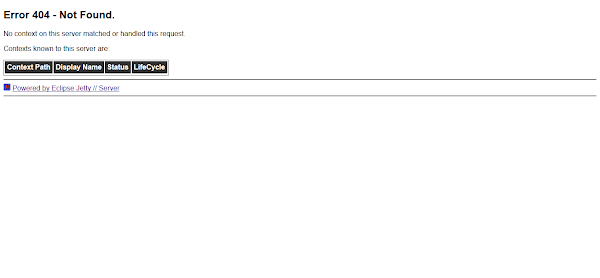
Jetty 9 web server has been installed on CentOS 7.
Deploy a Java Application on Jetty Server
Download a Java project source from GitHub.
We are downloading simple-crud-app, which is a simple Hello World application.
curl -O https://codeload.github.com/trdngy/toy-project-1/zip/masterExtract downloaded file.
unzip masterThis project is powered by Apache Maven, therefore, we have to install Apache Maven to compile this project.
yum install -y mavenVerify Apache Maven installation by checking its version.
mvn -vOutput:
Apache Maven 3.0.5 (Red Hat 3.0.5-17)
Maven home: /usr/share/maven
Java version: 1.8.0_212, vendor: Oracle Corporation
Java home: /usr/lib/jvm/java-1.8.0-openjdk-1.8.0.212.b04-0.el7_6.x86_64/jre
Default locale: en_US, platform encoding: UTF-8
OS name: "linux", version: "3.10.0-957.el7.x86_64", arch: "amd64", family: "unix"
Compile the source to generate WAR file. We will deploy this WAR on our Jetty 9 web server.
cd toy-project-1-master/
mvn compile
Output:
[INFO] Scanning for projects...
[INFO]
[INFO] ------------------------------------------------------------------------
[INFO] Building simple-crud-app Maven Webapp 0.0.1
[INFO] ------------------------------------------------------------------------
[INFO]
[INFO] --- maven-resources-plugin:2.5:resources (default-resources) @ simple-crud-app ---
[debug] execute contextualize
[WARNING] Using platform encoding (UTF-8 actually) to copy filtered resources, i.e. build is platform dependent!
[INFO] Copying 1 resource
[INFO]
[INFO] --- maven-compiler-plugin:2.3.2:compile (default-compile) @ simple-crud-app ---
[WARNING] File encoding has not been set, using platform encoding UTF-8, i.e. build is platform dependent!
[INFO] Compiling 8 source files to /tmp/toy-project-1-master/target/classes
[INFO] ------------------------------------------------------------------------
[INFO] BUILD SUCCESS
[INFO] ------------------------------------------------------------------------
[INFO] Total time: 4.954s
[INFO] Finished at: Wed May 15 01:18:17 PKT 2019
[INFO] Final Memory: 13M/32M
[INFO] ------------------------------------------------------------------------
Build WAR file to deploy on our Jetty 9 web server.
mvn packageOutput:
[INFO] Scanning for projects...
[INFO]
[INFO] ------------------------------------------------------------------------
[INFO] Building simple-crud-app Maven Webapp 0.0.1
[INFO] ------------------------------------------------------------------------
[INFO]
[INFO] --- maven-resources-plugin:2.5:resources (default-resources) @ simple-crud-app ---
[debug] execute contextualize
[WARNING] Using platform encoding (UTF-8 actually) to copy filtered resources, i.e. build is platform dependent!
[INFO] Copying 1 resource
[INFO]
[INFO] --- maven-compiler-plugin:2.3.2:compile (default-compile) @ simple-crud-app ---
[INFO] Nothing to compile - all classes are up to date
[INFO]
[INFO] --- maven-resources-plugin:2.5:testResources (default-testResources) @ simple-crud-app ---
[debug] execute contextualize
[WARNING] Using platform encoding (UTF-8 actually) to copy filtered resources, i.e. build is platform dependent!
[INFO] skip non existing resourceDirectory /tmp/toy-project-1-master/src/test/resources
[INFO]
[INFO] --- maven-compiler-plugin:2.3.2:testCompile (default-testCompile) @ simple-crud-app ---
[INFO] No sources to compile
[INFO]
[INFO] --- maven-surefire-plugin:2.10:test (default-test) @ simple-crud-app ---
[INFO] No tests to run.
[INFO] Surefire report directory: /tmp/toy-project-1-master/target/surefire-reports

-------------------------------------------------------
 T E S T S
-------------------------------------------------------

Results :

Tests run: 0, Failures: 0, Errors: 0, Skipped: 0

[INFO]
[INFO] --- maven-war-plugin:3.2.0:war (default-war) @ simple-crud-app ---
[INFO] Packaging webapp
[INFO] Assembling webapp [simple-crud-app] in [/tmp/toy-project-1-master/target/simple-crud-app]
[INFO] Processing war project
[INFO] Copying webapp resources [/tmp/toy-project-1-master/src/main/webapp]
[INFO] Webapp assembled in [378 msecs]
[INFO] Building war: /tmp/toy-project-1-master/target/simple-crud-app.war
[INFO] ------------------------------------------------------------------------
[INFO] BUILD SUCCESS
[INFO] ------------------------------------------------------------------------
[INFO] Total time: 7.324s
[INFO] Finished at: Wed May 15 01:19:15 PKT 2019
[INFO] Final Memory: 9M/92M
[INFO] ------------------------------------------------------------------------
Copy the generated WAR file in Jetty 9 webapps directory.
mv /tmp/toy-project-1-master/target/simple-crud-app.war /opt/jetty/webapps/If you access the URL http://jetty-01.example.com:8080/ , you may notice that our application is automatically added in Jetty 9 web server.
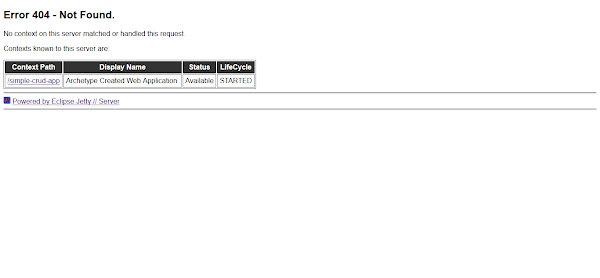
Browser URL http://jetty-01.example.com:8080/simple-crud-app/ to access our Java Web Application via Jetty 9 web server.

We have successfully deployed a Java web application in our Jetty 9 web server on CentOS 7.
Final Thoughts
Installing Jetty on CentOS 7 gives you a lightweight and efficient Java-based web server and servlet container, ideal for running modern web applications. In this guide, we covered downloading Jetty, configuring the environment, setting up the service, and verifying the installation.
With Jetty now successfully installed, you have a flexible and scalable platform ready to support your Java applications. To maintain optimal performance and security, remember to keep Jetty updated, secure your server configurations, and monitor your applications regularly.
From setting up scalable AWS solutions to managing complex Linux environments, I’ve got you covered. Visit my Freelancer profile to get started.
Recommended Courses
If you’re serious about mastering Java in 2025, the Java Masterclass 2025: 130+ Hours of Expert Lessons by Tim Buchalka, Edwin Einsen, and Igor Popovic is a must-have resource. This comprehensive course takes you from beginner to advanced concepts with real-world coding exercises, practical projects, and deep insights from industry experts.
Whether you’re preparing for a programming career, upgrading your skills for the job market, or simply passionate about software development, this course offers everything you need in one place. Don’t miss out on the chance to future-proof your skills and stay ahead in the ever-evolving world of Java.
Disclaimer: This post contains affiliate links. If you purchase through these links, I may earn a small commission at no extra cost to you, which helps support the site and keeps valuable content coming your way.





Leave a Reply
You must be logged in to post a comment.