
Learn how to install Oracle 21c on Rocky Linux 8 with our comprehensive step-by-step guide. Set up your Oracle database efficiently on Rocky Linux 8 today. #centlinux #linux #oracle
Table of Contents
What is Oracle 21c?
Oracle Database offers market-leading performance, scalability, reliability, and security, both on-premises and in the cloud. Oracle Database 21c is the current long term release, and it provides the highest level of release stability and longest time-frame for support and bug fixes.
Oracle Database 21c is available for production with many enhancements and new capabilities. These include autonomous administration, improved multi-model support through in-database Javascript and native block-chain tables, and multi-workload improvements such as AutoML and sharding enhancements that will be incorporated into future long term releases.
Oracle has consistently taken the approach that storing and managing data in a converged database is more efficient and productive than breaking up into multiple single-use engines – which inevitably results in data integrity, consistency and security issues. Simply put, a converged database is a multi-model, multi-tenant, multi-workload database. Oracle Database fully supports multiple data models and access methods, simplifies consolidation while ensuring isolation, and excels in typical database workload use cases – both operational and analytical.
The 21c generation of Oracle’s converged database therefore offers customers: best of breed support for all data types (e.g. relational, JSON, XML, spatial, graph, OLAP, etc.), and industry-leading performance, scalability, availability and security for all their operational, analytical and other mixed workloads. Oracle’s converged strategy also ensures that developers benefit from all Oracle Database 21c key capabilities (e.g. ACID transactions, read consistency, parallel scans and DML, online backups, etc.) – freeing them to focus on developing applications without having to worry about data persistence.
Unlike Oracle Linux, to install Oracle 21c on Rocky Linux 8, we have to perform additional configuration steps. Because the Preinstall package only works for Oracle Linux OS, therefore, we need to manually perform each step to install Oracle 21c on Rocky Linux 8.

What’s new in Oracle 21c?
The distinct features of Oracle Database 21c are:
- Blockchain Tables
- Multilingual Engine – JavaScript Execution in the Database
- Binary JSON Data Type
- Per-PDB Data Guard Physical Standby (aka Multitenant Data Guard)
- Per-PDB GoldenGate Change Capture
- Self-Managing In-Memory
- In-Memory Hybrid Columnar Scan
- In-Memory Vector Joins with SIMD
- Sharding Advisor Tool
- Property Graph Visualization Studio
- Automatic Materialized Views
- Automatic Zone Maps
- SQL Macros
- Gradual Password Rollover
Now, you have understand the features and benefits of industry most popular database server. Let’s move forward to install Oracle 21c on Rocky Linux 8.
Recommended Courses
If you’re serious about mastering databases, The Complete Oracle SQL Bootcamp (2025) by Code Star Academy is a must-have course to sharpen your SQL skills from beginner to advanced level. Whether you’re preparing for a database certification, aiming to boost your IT career, or simply want hands-on knowledge of Oracle SQL, this course provides structured lessons, practical exercises, and real-world examples to accelerate your learning journey.
It’s an excellent investment for students, professionals, and developers who want to stand out in today’s competitive job market.
Disclaimer: This post contains affiliate links. If you purchase through these links, I may earn a small commission at no additional cost to you. This helps support my blog and allows me to keep creating valuable content for you.
Environment Specification
We are using a Rocky Linux 8 minimal server with following specifications.
- CPU – 3.4 Ghz (2 cores)
- Memory – 2 GB
- Storage – 20 GB
- Operating System – Rocky Linux 8.6 (Green Obsidian)
- Hostname – oracle-02.centlinux.com
- IP Address – 192.168.116.128 /24
For setting up your Oracle 21c environment, you can use a dedicated Mini PC or a reliable VPS like those offered by Hostinger. Both options are excellent for creating a stable home lab where you can experiment with Rocky Linux 8 and Oracle Database configurations safely. A Mini PC provides a personal, always-available physical server ideal for hands-on learning and testing.
[Grab a Mini PC for your Home Lab – Shop with Us!]
While a Hostinger VPS offers flexible cloud-based resources accessible from anywhere.
[Power Your Projects with Hostinger VPS – Join Here!]
Choosing either will give you a robust platform to deepen your Linux and Oracle skills effectively.
Disclaimer: Some of the links in this post are affiliate links. This means if you click on the link and make a purchase, I may earn a small commission at no extra cost to you. These commissions help support the blog and enable me to continue delivering quality technical content.
Configure Hostname and Local DNS Resolution
Connect with oracle-02.centlinux.com as root user by means of a ssh client.
Set the hostname of your Rocky Linux server by using hostnamectl command.
hostnamectl set-hostname oracle-02.centlinux.comIt is a good idea to set local DNS resolution, so your Linux server does not look for a Private DNS server to resolve it’s own hostname.
To setup local DNS resolution, you need to add an entry in /etc/hosts file. The following command will do this, you only need to change IP Address and hostname according to your environment.
echo "192.168.116.129 oracle-02.centlinux.com oracle-02" >> /etc/hostsUpdate Linux Software Packages
Rebuild cache of your enabled yum repositories.
dnf makecacheNow, you can easily update software packages in your Linux operating system by using dnf command.
dnf update -yIf the above command updates your Linux Kernel, then you should reboot your operating system before moving forward.
rebootAfter successful reboot, verify the versions of Linux operating system and Kernel that are being used in this tutorial.
cat /etc/rocky-release
uname -r
Output:
Rocky Linux release 8.6 (Green Obsidian)
4.18.0-372.16.1.el8_6.0.1.x86_64
Disable Transparent Hugepages
Oracle recommends that, you must disable the Transparent Hugepages before installing their database server.
We have already wrote an tutorial on how to disable the Transparent Hugepages in Linux. You can follow that guide, to disable this Linux memory management feature.
Before start to Oracle 21c installation, you can verify that, if the Transparent Hugepages are successfully disabled in your Linux operating system.
cat /sys/kernel/mm/transparent_hugepage/enabledOutput:
always madvise [never]
if you find the [never] in the output of above command, then this memory management feature has been disabled successfully.
Install Oracle 21c Prerequisites
We are providing a single dnf command to install all the prerequisite software packages of Oracle Database 21c. Execute this command at your Linux bash prompt.
dnf install -y bc binutils compat-openssl10 elfutils-libelf glibc glibc-devel ksh libaio libXrender libX11 libXau libXi libXtst libgcc libnsl libstdc++ libxcb libibverbs make policycoreutils policycoreutils-python-utils smartmontools sysstat libnsl2 net-tools nfs-utils unzipCreate Linux Users and Groups
Oracle Database 21c requires a few Linux users and groups. You can create it by executing following group of commands.
groupadd -g 1501 oinstall
groupadd -g 1502 dba
groupadd -g 1503 oper
groupadd -g 1504 backupdba
groupadd -g 1505 dgdba
groupadd -g 1506 kmdba
groupadd -g 1507 racdba
useradd -u 1501 -g oinstall -G dba,oper,backupdba,dgdba,kmdba,racdba oracle
echo "oracle" | passwd oracle --stdin
Set Linux Security Limits for Oracle User
Create a configuration file in /etc/security/limits.d directory, to set the security limits for the oracle user.
vi /etc/security/limits.d/30-oracle.confDefine following settings in this file.
oracle   soft   nofile   1024
oracle   hard   nofile   65536
oracle   soft   nproc    16384
oracle   hard   nproc    16384
oracle   soft   stack    10240
oracle   hard   stack    32768
oracle   hard   memlock  134217728
oracle   soft   memlock  134217728
oracle   soft   data     unlimited
oracle   hard   data     unlimited
Set Linux Kernel Parameters
Create a configuration file in /etc/sysctl.d directory by using vim text editor.
vi /etc/sysctl.d/98-oracle.confDefine the following Linux Kernel parameters as required by the Oracle Database 21c.
fs.file-max = 6815744
kernel.sem = 250 32000 100 128
kernel.shmmni = 4096
kernel.shmall = 1073741824
kernel.shmmax = 4398046511104
kernel.panic_on_oops = 1
net.core.rmem_default = 262144
net.core.rmem_max = 4194304
net.core.wmem_default = 262144
net.core.wmem_max = 1048576
net.ipv4.conf.all.rp_filter = 2
net.ipv4.conf.default.rp_filter = 2
fs.aio-max-nr = 1048576
net.ipv4.ip_local_port_range = 9000 65500
Reload Kernel parameters now by using sysctl command.
sysctl -pConfigure SELinux Target Mode
Persistently set SELinux target mode to permissive by executing following commands at Linux bash prompt.
sed -i 's/^SELINUX=.*/SELINUX=permissive/g' /etc/selinux/config
setenforce permissive
Configure Linux Firewall
Allow Oracle SQL* Net Listener port 1521/tcp in Linux Firewall.
firewall-cmd --permanent --add-port=1521/tcp
firewall-cmd --reload
Create Directories for Oracle 21c Installation
Create the necessary directories for Oracle software and adjust the ownership and permissions on these directories.
mkdir -p /u01/app/oracle/product/21.3.0/dbhome_1
mkdir -p /u02/oradata
chown -R oracle:oinstall /u01 /u02
chmod -R 775 /u01 /u02
Here, we have created two directories, /u01 for the Oracle RDBMS and /u02 for the Oracle Databases.
Read Also: Install Oracle XE 21c on Rocky Linux 8
Configure Linux Environment for Oracle User
Switch to oracle user.
su - oracleOpen .bash_profile in vim text editor.
vi ~/.bash_profileAdd following lines to set environment variables for oracle user.
# Oracle Settings
# Install Oracle 21c on Rocky Linux 8
export TMP=/tmp
export TMPDIR=$TMP

export ORACLE_HOSTNAME=oracle-02.centlinux.com
export ORACLE_UNQNAME=cdb1
export ORACLE_BASE=/u01/app/oracle
export ORACLE_HOME=$ORACLE_BASE/product/21.3.0/dbhome_1
export ORA_INVENTORY=/u01/app/oraInventory
export ORACLE_SID=cdb1
export PDB_NAME=pdb1
export DATA_DIR=/u02/oradata
export PATH=$ORACLE_HOME/bin:$PATH
export LD_LIBRARY_PATH=$ORACLE_HOME/lib:/lib:/usr/lib
export CLASSPATH=$ORACLE_HOME/jlib:$ORACLE_HOME/rdbms/jlib
Manually execute the .bash_profile to set the environment for current Linux shell.
source ~/.bash_profileInstall Oracle 21c on Rocky Linux 8
You can download from Oracle official website and install Oracle 21c on Rocky Linux. You have to create a free Oracle Single Sign-On account to login and download the Oracle setup.
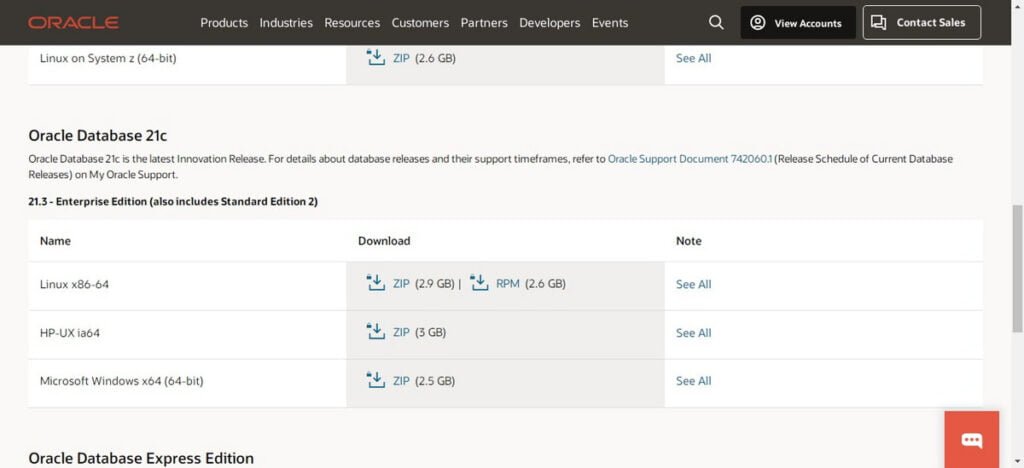
We have downloaded Oracle Database 21c (21.3) for Linux and transferred it into home directory of oracle user.
ls ~Output:
LINUX.X64_213000_db_home.zip
Unzip the downloaded zip file to ORACLE_HOME directory.
unzip LINUX.X64_213000_db_home.zip -d $ORACLE_HOMEGo to ORACLE_HOME directory and start Oracle Database 21c installation in silent mode.
cd $ORACLE_HOME
./runInstaller -ignorePrereq -waitforcompletion -silent \
oracle.install.option=INSTALL_DB_SWONLY \
ORACLE_HOSTNAME=${ORACLE_HOSTNAME} \
UNIX_GROUP_NAME=oinstall \
INVENTORY_LOCATION=${ORA_INVENTORY} \
ORACLE_HOME=${ORACLE_HOME} \
ORACLE_BASE=${ORACLE_BASE} \
oracle.install.db.InstallEdition=EE \
oracle.install.db.OSDBA_GROUP=dba \
oracle.install.db.OSBACKUPDBA_GROUP=backupdba \
oracle.install.db.OSDGDBA_GROUP=dgdba \
oracle.install.db.OSKMDBA_GROUP=kmdba \
oracle.install.db.OSRACDBA_GROUP=racdba \
SECURITY_UPDATES_VIA_MYORACLESUPPORT=false \
DECLINE_SECURITY_UPDATES=true
Output:
Launching Oracle Database Setup Wizard...

The response file for this session can be found at:
 /u01/app/oracle/product/21.3.0/dbhome_1/install/response/db_2022-07-23_10-08-38PM.rsp

You can find the log of this install session at:
 /tmp/InstallActions2022-07-23_10-08-38PM/installActions2022-07-23_10-08-38PM.log

As a root user, execute the following script(s):
        1. /u01/app/oraInventory/orainstRoot.sh
        2. /u01/app/oracle/product/21.3.0/dbhome_1/root.sh

Execute /u01/app/oraInventory/orainstRoot.sh on the following nodes:

[oracle-02]

Execute /u01/app/oracle/product/21.3.0/dbhome_1/root.sh on the following nodes:

[oracle-02]

Successfully Setup Software. Moved the install session logs to: /u01/app/oraInventory/logs/InstallActions2022-07-23_10-08-38PM
Switch to root user.
su -Execute Oracle 21c post-installation scripts.
/u01/app/oraInventory/orainstRoot.shOutput:
Changing permissions of /u01/app/oraInventory.
Adding read,write permissions for group.
Removing read,write,execute permissions for world.

Changing groupname of /u01/app/oraInventory to oinstall.
The execution of the script is complete.
/u01/app/oracle/product/21.3.0/dbhome_1/root.sh
exit
You have successfully install Oracle 21c on Linux 8. If you feel any difficulty in understanding the above commands, then we recommend that you should read the following book or it is much better if you attend the following online training for quick results.
Create Your First Oracle Multitenant Database
Start Oracle Listener by executing lsnrctl command.
lsnrctl startOutput:
LSNRCTL for Linux: Version 21.0.0.0.0 - Production on 23-JUL-2022 22:56:29

Copyright (c) 1991, 2021, Oracle.  All rights reserved.

Starting /u01/app/oracle/product/21.3.0/dbhome_1/bin/tnslsnr: please wait...

TNSLSNR for Linux: Version 21.0.0.0.0 - Production
Log messages written to /u01/app/oracle/diag/tnslsnr/oracle-02/listener/alert/log.xml
Listening on: (DESCRIPTION=(ADDRESS=(PROTOCOL=tcp)(HOST=oracle-02.centlinux.com)(PORT=1521)))

Connecting to (ADDRESS=(PROTOCOL=tcp)(HOST=)(PORT=1521))
STATUS of the LISTENER
------------------------
Alias                     LISTENER
Version                   TNSLSNR for Linux: Version 21.0.0.0.0 - Production
Start Date                23-JUL-2022 22:56:29
Uptime                    0 days 0 hr. 0 min. 2 sec
Trace Level               off
Security                  ON: Local OS Authentication
SNMP                      OFF
Listener Log File         /u01/app/oracle/diag/tnslsnr/oracle-02/listener/alert/log.xml
Listening Endpoints Summary...
  (DESCRIPTION=(ADDRESS=(PROTOCOL=tcp)(HOST=oracle-02.centlinux.com)(PORT=1521)))
The listener supports no services
The command completed successfully
Create an Oracle Multitenant database by using the following command.
dbca -silent -createDatabase \
-templateName General_Purpose.dbc \
-gdbname ${ORACLE_SID} \
-sid ${ORACLE_SID} \
-responseFile NO_VALUE \
-characterSet AL32UTF8 \
-sysPassword Str@ngP@55 \
-systemPassword Str@ngP@55 \
-createAsContainerDatabase true \
-numberOfPDBs 1 \
-pdbName ${PDB_NAME} \
-pdbAdminPassword Str@ngP@55 \
-databaseType MULTIPURPOSE \
-automaticMemoryManagement false \
-totalMemory 800 \
-storageType FS \
-datafileDestination "${DATA_DIR}" \
-redoLogFileSize 50 \
-emConfiguration NONE \
-ignorePreReqs \
Output:
Prepare for db operation
8% complete
Copying database files
31% complete
Creating and starting Oracle instance
32% complete
36% complete
40% complete
43% complete
46% complete
Completing Database Creation
51% complete
53% complete
54% complete
Creating Pluggable Databases
58% complete
77% complete
Executing Post Configuration Actions
100% complete
Database creation complete. For details check the logfiles at:
 /u01/app/oracle/cfgtoollogs/dbca/cdb1.
Database Information:
Global Database Name:cdb1
System Identifier(SID):cdb1
Look at the log file "/u01/app/oracle/cfgtoollogs/dbca/cdb1/cdb1.log" for further details.
Edit /etc/oratab file by using vim text editor.
vi /etc/oratabFind and edit following setting to enable autostart of Oracle Instance.
cdb1:/u01/app/oracle/product/21.3.0/dbhome_1:YConnect to SQL Shell by using sqlplus command.
sqlplus / as sysdbaEnable Oracle Managed File (OMF) to simplify the creation of databases and database files.
ALTER SYSTEM SET DB_CREATE_FILE_DEST='/u02/oradata' SCOPE=BOTH;Enable autostart of Pluggable databases with the startup of Container Database.
ALTER PLUGGABLE DATABASE PDB1 SAVE STATE;
exit
Configure AutoStart of Oracle Database 21c Server
To configure autostart of Oracle Database 21c on Rocky Linux 8, you have to create a Systemd service.
Switch to root user.
su -Create a Systemd service unit by using vim text editor
vi /usr/lib/systemd/system/dbora.serviceAdd following directives in this file.
[Unit]
Description=Oracle Database Service
After=network.target

[Service]
Type=forking
ExecStart=/u01/app/oracle/product/21.3.0/dbhome_1/bin/dbstart /u01/app/oracle/product/21.3.0/dbhome_1
ExecStop=/u01/app/oracle/product/21.3.0/dbhome_1/bin/dbshut /u01/app/oracle/product/21.3.0/dbhome_1
User=oracle
TimeoutSec=300s

[Install]
WantedBy=multi-user.target
Enable and start Oracle Database 21c service.
systemctl enable --now dbora.serviceVerify the status of the Oracle Database 21c service.
systemctl status dbora.serviceOutput:
● dbora.service - Oracle Database Service
   Loaded: loaded (/usr/lib/systemd/system/dbora.service; enabled; vendor prese>
   Active: active (running) since Sat 2022-07-23 23:44:20 PKT; 42s ago
  Process: 4021 ExecStart=/u01/app/oracle/product/21.3.0/dbhome_1/bin/dbstart />
    Tasks: 62 (limit: 12216)
   Memory: 1.1G
   CGroup: /system.slice/dbora.service
           ├─4136 ora_pmon_cdb1
           ├─4140 ora_clmn_cdb1
           ├─4144 ora_psp0_cdb1
           ├─4148 ora_vktm_cdb1
           ├─4154 ora_gen0_cdb1
           ├─4158 ora_mman_cdb1
           ├─4164 ora_gen1_cdb1
           ├─4166 ora_gen2_cdb1
           ├─4168 ora_vosd_cdb1
           ├─4173 ora_diag_cdb1
           ├─4177 ora_ofsd_cdb1
           ├─4179 ora_dbrm_cdb1
           ├─4182 ora_vkrm_cdb1
           ├─4186 ora_svcb_cdb1
           ├─4188 ora_pman_cdb1
           ├─4190 ora_dia0_cdb1
Read Also: Install Oracle Database 21c on RHEL 8
Final Thoughts
Installing Oracle 21c on Rocky Linux 8 is a systematic process that requires careful attention to prerequisites, configurations, and installation steps. By following this guide, you have successfully set up a robust Oracle Database environment on a reliable and stable Linux distribution. Oracle 21c provides cutting-edge features and performance enhancements that are ideal for managing large-scale enterprise databases.
This installation ensures your system is optimized for database operations, with appropriate kernel parameters, user configurations, and necessary dependencies. Whether you’re managing databases for development, testing, or production, Oracle 21c on Rocky Linux 8 is a powerful combination for reliability and efficiency.
If you’re new to Oracle or Linux, consider experimenting with test environments before deploying in production to familiarize yourself with the system. For additional guidance or troubleshooting, refer to Oracle’s official documentation or community resources. You’re now ready to explore the full capabilities of Oracle 21c!
Optimize your cloud infrastructure and secure your servers with my AWS and Linux administration services. Let’s ensure your systems run smoothly. Connect with me now! if you need any guidance or advice related to your Linux VPS.
FAQs
Q1: Can Oracle 21c be installed alongside other Oracle versions on Rocky Linux 8?
Yes, you can install multiple Oracle versions by configuring separate Oracle homes and using different ports to avoid conflicts.
Q2: Do I need to disable SELinux to install Oracle 21c on Rocky Linux 8?
It’s recommended to set SELinux to permissive mode during installation to avoid permission issues but not permanently disable it for security reasons.
Q3: How much RAM and CPU does Oracle 21c require for a basic installation on Rocky Linux 8?
A minimum of 2 GB RAM and 2 CPU cores are recommended for a smooth installation and basic operation.
Q4: Can I install Oracle 21c without a GUI on Rocky Linux 8?
Yes, Oracle 21c can be installed in silent mode using command-line scripts, which is useful on servers without a graphical interface.
Q5: What kernel parameters should I check or modify before installing Oracle 21c?
Ensure kernel parameters like fs.file-max, kernel.shmmax, and kernel.sem meet Oracle’s minimum requirements to avoid runtime errors.

Leave a Reply
You must be logged in to post a comment.