
Learn how to install Oracle Database 21c on RHEL 8 with this comprehensive step-by-step guide. Ensure a smooth setup of Oracle’s latest database technology on your Linux system. #centlinux #linux #oracle
Table of Contents
What is Oracle Database?
Oracle Database, developed by Oracle Corporation, is one of the most widely used and powerful relational database management systems (RDBMS) in the world. It is designed to efficiently manage a large amount of data and support multiple concurrent users, making it suitable for a variety of enterprise-level applications. Here’s an overview of Oracle Database:
Key Features of Oracle Database
- Relational Database Management: Organizes data into tables that can be related based on data common to each. This structure allows for complex querying and data management.
- Multimodel Database: Supports not only traditional relational data but also JSON, XML, spatial, graph, and other types of data, allowing for versatile data management within a single database system.
- High Availability and Scalability: Features like Real Application Clusters (RAC), Data Guard, and GoldenGate ensure high availability and disaster recovery. Oracle Database can scale vertically (adding resources to a single server) and horizontally (adding more servers).
- Performance: Advanced indexing, partitioning, and caching mechanisms, along with features like Oracle Exadata, enhance performance for both transaction processing and data warehousing.
- Security: Comprehensive security features including encryption, data masking, auditing, and access controls to protect sensitive data and ensure regulatory compliance.
- Automation and Management: Tools like Oracle Enterprise Manager and Autonomous Database capabilities automate many routine management tasks such as patching, tuning, backups, and upgrades, reducing administrative overhead.
- Cloud Integration: Supports hybrid and multi-cloud environments with seamless integration into Oracle Cloud Infrastructure (OCI) and other cloud platforms, providing flexible deployment options.
- Advanced Analytics and Machine Learning: Built-in analytics and machine learning capabilities allow users to perform sophisticated data analysis and build predictive models directly within the database.
- Application Development: Supports various programming languages and frameworks, including PL/SQL, Java, Python, and RESTful services, facilitating the development of modern applications.
- Data Warehousing and Big Data: Specialized features for data warehousing, such as Oracle Exadata, and big data integration, support complex analytical queries and large-scale data processing.
Use Cases
- Enterprise Resource Planning (ERP): Manages core business processes like finance, HR, and supply chain with high efficiency and reliability.
- Customer Relationship Management (CRM): Powers CRM systems by managing vast amounts of customer data and transaction records.
- Data Warehousing: Enables businesses to consolidate data from various sources into a single repository for analysis and reporting.
- E-commerce: Supports online retail operations by handling high transaction volumes and ensuring data security.
- Healthcare: Manages patient records and healthcare data, ensuring compliance with regulations like HIPAA.
- Financial Services: Processes and secures transactions for banking, investment, and insurance applications.
Advantages
- Reliability and Stability: Trusted for mission-critical applications due to its robustness and reliability.
- Comprehensive Ecosystem: Wide range of tools and resources for database management, development, and analytics.
- Support and Community: Strong support from Oracle and a large user community, providing resources and assistance for troubleshooting and optimization.
Conclusion
Oracle Database is a powerful, versatile, and secure RDBMS that supports a wide range of applications and data types. Its comprehensive feature set and scalability make it a preferred choice for large enterprises and mission-critical applications across various industries.
New Features in Oracle Database 21c
The distinct features of Oracle Database 21c are:
- Blockchain Tables
- Multilingual Engine – JavaScript Execution in the Database
- Binary JSON Data Type
- Per-PDB Data Guard Physical Standby (aka Multitenant Data Guard)
- Per-PDB GoldenGate Change Capture
- Self-Managing In-Memory
- In-Memory Hybrid Columnar Scan
- In-Memory Vector Joins with SIMD
- Sharding Advisor Tool
- Property Graph Visualization Studio
- Automatic Materialized Views
- Automatic Zone Maps
- SQL Macros
- Gradual Password Rollover
Read Also: How to install Oracle 21c on Rocky Linux 8
Environment Specification
We are using a minimal Red Hat Enterprise Linux 8 virtual machine with following specifications.
- CPU – 3.4 Ghz (2 cores)
- Memory – 2 GB
- Storage – 20 GB
- Operating System – Red Hat Enterprise Linux 8.5
- Hostname – oracle-01.centlinux.com
- IP Address – 192.168.116.128 /24
For setting up your Oracle Database 21c environment on RHEL 8, it’s ideal to have a dedicated system that can handle the resource demands efficiently. Many Linux enthusiasts and professionals opt for a Mini PC or a VPS, such as those provided by Rose Hosting, to create a flexible and cost-effective home lab. A Mini PC offers the benefit of a physical machine to experiment with.
[Grab a Mini PC for your Home Lab – Shop with Us!]
While a Rose Hosting VPS provides cloud-based scalability and easy remote access.
[Discover the Power of Rose Hosting VPS – Limited Time Offer!]
Both options are excellent for practicing Linux server administration and database management in a controlled, real-world environment. If you’re interested in building your own lab, consider the Mini PC and Rose Hosting VPS links below to get started quickly and reliably.
Disclaimer: This post contains affiliate links. If you purchase through these links, I may earn a commission at no extra cost to you, helping support the blog and future tutorials.
Oracle Database Preinstallation Configuration
Set Hostname and Local DNS Resolution
By using a SSH client, connect with oracle-01.centlinux.com as root user.
Set an appropriate hostname for your Oracle Database server with the help of following Linux command.
hostnamectl set-hostname oracle-01.centlinux.comExecute following command to add an entry in Local DNS Resolver or you can use a DNS server (if available).
echo "192.168.116.128 oracle-01.centlinux.com oracle-01" >> /etc/hostsUpdate Linux Operating System
It is the best practice to update your Linux operating system before a new software installation. Therefore, use dnf package manager to update your exisiting software packages.
dnf makecache
dnf update -y
If Package Manager updates your Linux Kernel, then you should reboot your Linux operating system with the new Kernel.
rebootVerify the Linux Kernel and Operating System versions that are being used in this installation guide.
uname -r
cat /etc/redhat-release
Output:
4.18.0-348.2.1.el8_5.x86_64
Red Hat Enterprise Linux release 8.5 (Ootpa)
Disable Transparent HugePages in RHEL 8
Oracle recommends that you disable Transparent HugePages, because they may cause delays in accessing memory that can result in node restarts in Oracle RAC environments and performance issues or delays for Oracle Database single instances. Instead, Oracle recommends using Standard HugePages for Linux based operating systems.
Transparent HugePages are enable by default in EL (Enterprise Linux) 6 or later.
Verify that Transparent HugePages are enabled on your Linux server.
cat /sys/kernel/mm/transparent_hugepage/enabledOutput:
always madvise [never]
We have already disabled the Transparent HugePages in our Linux server. You can do the same by following our previous article about how to disable transparent hugepages.
Install Oracle Database 21c Prerequisites
For proper functioning Oracle Database 21c depends upon various third party software packages.
Fortunately, all these required packages are available in RHEL 8 default yum repositories. Execute following dnf command to install all these prerequisites in one go.
Make sure you have acquire an active Red Hat Subscription or you may not complete this step successfully.
dnf install -y bc binutils compat-openssl10 elfutils-libelf glibc glibc-devel ksh libaio libXrender libX11 libXau libXi libXtst libgcc libnsl libstdc++ libxcb libibverbs make policycoreutils policycoreutils-python-utils smartmontools sysstat libnsl2 libnsl2-devel net-tools nfs-utils unzipCreate Linux Users and Groups
Create Linux users and groups as required by Oracle Database 21c.
groupadd -g 1501 oinstall
groupadd -g 1502 dba
groupadd -g 1503 oper
groupadd -g 1504 backupdba
groupadd -g 1505 dgdba
groupadd -g 1506 kmdba
groupadd -g 1507 racdba
useradd -u 1501 -g oinstall -G dba,oper,backupdba,dgdba,kmdba,racdba oracle
echo "oracle" | passwd oracle --stdin
Set Security limits for oracle user
Create a configuration file in /etc/security/limits.d directory, to set the security limits for the oracle user.
vi /etc/security/limits.d/30-oracle.confAdd following lines in this file.
oracle   soft   nofile   1024
oracle   hard   nofile   65536
oracle   soft   nproc    16384
oracle   hard   nproc    16384
oracle   soft   stack    10240
oracle   hard   stack    32768
oracle   hard   memlock  134217728
oracle   soft   memlock  134217728
oracle   soft   data     unlimited
oracle   hard   data     unlimited
Set Linux Kernel Parameters
Create a configuration file in /etc/sysctl.d directory.
vi /etc/sysctl.d/98-oracle.confSet the following Linux Kernel parameters as required by the Oracle Database 21c.
fs.file-max = 6815744
kernel.sem = 250 32000 100 128
kernel.shmmni = 4096
kernel.shmall = 1073741824
kernel.shmmax = 4398046511104
kernel.panic_on_oops = 1
net.core.rmem_default = 262144
net.core.rmem_max = 4194304
net.core.wmem_default = 262144
net.core.wmem_max = 1048576
net.ipv4.conf.all.rp_filter = 2
net.ipv4.conf.default.rp_filter = 2
fs.aio-max-nr = 1048576
net.ipv4.ip_local_port_range = 9000 65500
Reload Kernel parameters now by using sysctl command.
sysctl -pConfigure SELinux Target Mode
Persistently set SELinux mode to permissive.
sed -i 's/^SELINUX=.*/SELINUX=permissive/g' /etc/selinux/config
setenforce permissive
Configure Linux Firewall
Allow Oracle SQL* Net Listener port 1521/tcp in Linux Firewall.
firewall-cmd --permanent --add-port=1521/tcp
firewall-cmd --reload
Create Directories for Oracle Database 21c
Create the necessary directories for Oracle software and adjust the ownership and permissions on these directories.
mkdir -p /u01/app/oracle/product/21.3.0/dbhome_1
mkdir -p /u02/oradata
chown -R oracle:oinstall /u01 /u02
chmod -R 775 /u01 /u02
Here, we have created two directories, /u01 for the Oracle RDBMS and /u02 for the Oracle Databases.
Configure Linux Environment for Oracle User
Switch to oracle user.
su - oracleand open .bash_profile in vim text editor.
vi ~/.bash_profileAdd following lines to set environment variables for oracle user.
# Oracle Settings
export TMP=/tmp
export TMPDIR=$TMP

export ORACLE_HOSTNAME=oracle-01.centlinux.com
export ORACLE_UNQNAME=cdb1
export ORACLE_BASE=/u01/app/oracle
export ORACLE_HOME=$ORACLE_BASE/product/21.3.0/dbhome_1
export ORA_INVENTORY=/u01/app/oraInventory
export ORACLE_SID=cdb1
export PDB_NAME=pdb1
export DATA_DIR=/u02/oradata

export PATH=$ORACLE_HOME/bin:$PATH

export LD_LIBRARY_PATH=$ORACLE_HOME/lib:/lib:/usr/lib
export CLASSPATH=$ORACLE_HOME/jlib:$ORACLE_HOME/rdbms/jlib
Manually execute the .bash_profile to set the environment for current Linux shell.
source ~/.bash_profileInstall Oracle Database 21c on RHEL 8
You can download Oracle Database 21c from Oracle official website. You have to create a free Oracle Single Sign-On account to login and download the software.
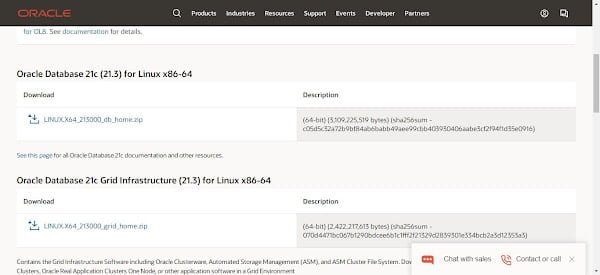
We have downloaded Oracle Database 21c (21.3) for Linux and transferred it into home directory of oracle user.
Unzip the downloaded zip file to ORACLE_HOME directory.
unzip LINUX.X64_213000_db_home.zip -d $ORACLE_HOMEGo to ORACLE_HOME directory and start Oracle Database 21c installation in silent mode.
cd $ORACLE_HOME
./runInstaller -ignorePrereq -waitforcompletion -silent \
oracle.install.option=INSTALL_DB_SWONLY \
ORACLE_HOSTNAME=${ORACLE_HOSTNAME} \
UNIX_GROUP_NAME=oinstall \
INVENTORY_LOCATION=${ORA_INVENTORY} \
ORACLE_HOME=${ORACLE_HOME} \
ORACLE_BASE=${ORACLE_BASE} \
oracle.install.db.InstallEdition=EE \
oracle.install.db.OSDBA_GROUP=dba \
oracle.install.db.OSBACKUPDBA_GROUP=backupdba \
oracle.install.db.OSDGDBA_GROUP=dgdba \
oracle.install.db.OSKMDBA_GROUP=kmdba \
oracle.install.db.OSRACDBA_GROUP=racdba \
SECURITY_UPDATES_VIA_MYORACLESUPPORT=false \
DECLINE_SECURITY_UPDATES=true
Output:
Launching Oracle Database Setup Wizard...

The response file for this session can be found at:
 /u01/app/oracle/product/21.3.0/dbhome_1/install/response/db_2021-12-10_08-46-35AM.rsp

You can find the log of this install session at:
 /tmp/InstallActions2021-12-10_08-46-35AM/installActions2021-12-10_08-46-35AM.log

As a root user, execute the following script(s):
        1. /u01/app/oraInventory/orainstRoot.sh
        2. /u01/app/oracle/product/21.3.0/dbhome_1/root.sh

Execute /u01/app/oraInventory/orainstRoot.sh on the following nodes:

[oracle-01]

 Execute /u01/app/oracle/product/21.3.0/dbhome_1/root.sh on the following nodes:

[oracle-01]

Successfully Setup Software. Moved the install session logs to:  /u01/app/oraInventory/logs/InstallActions2021-12-10_08-46-35AM
Switch to root user.
su -Execute post-installation scripts as root user.
/u01/app/oraInventory/orainstRoot.sh
/u01/app/oracle/product/21.3.0/dbhome_1/root.sh
exit
Output:
Changing permissions of /u01/app/oraInventory.
Adding read,write permissions for group.
Removing read,write,execute permissions for world.

Changing groupname of /u01/app/oraInventory to oinstall.
The execution of the script is complete.

Check /u01/app/oracle/product/21.3.0/dbhome_1/install/root_oracle-01.centlinux.com_2021-12-10_09-16-32-458187002.log for the output of root script
Oracle Database 21c has been installed on Red Hat Enterprise Linux 8.
Create an Oracle Multitenant Database
Start Oracle Listener
Start Oracle Listener by executing following command.
lsnrctl startOutput:
LSNRCTL for Linux: Version 21.0.0.0.0 - Production on 10-DEC-2021 09:18:26

Copyright (c) 1991, 2021, Oracle.  All rights reserved.

Starting /u01/app/oracle/product/21.3.0/dbhome_1/bin/tnslsnr: please wait...

TNSLSNR for Linux: Version 21.0.0.0.0 - Production
Log messages written to /u01/app/oracle/diag/tnslsnr/oracle-01/listener/alert/log.xml
Listening on: (DESCRIPTION=(ADDRESS=(PROTOCOL=tcp)(HOST=oracle-01.centlinux.com)(PORT=1521)))

Connecting to (ADDRESS=(PROTOCOL=tcp)(HOST=)(PORT=1521))
STATUS of the LISTENER
------------------------
Alias                     LISTENER
Version                   TNSLSNR for Linux: Version 21.0.0.0.0 - Production
Start Date                10-DEC-2021 09:18:26
Uptime                    0 days 0 hr. 0 min. 0 sec
Trace Level               off
Security                  ON: Local OS Authentication
SNMP                      OFF
Listener Log File         /u01/app/oracle/diag/tnslsnr/oracle-01/listener/alert/log.xml
Listening Endpoints Summary...
  (DESCRIPTION=(ADDRESS=(PROTOCOL=tcp)(HOST=oracle-01.centlinux.com)(PORT=1521)))
The listener supports no services
The command completed successfully
Create Multitenant Database
Create an Oracle Multitenant database by using the following command.
dbca -silent -createDatabase \
-templateName General_Purpose.dbc \
-gdbname ${ORACLE_SID} \
-sid ${ORACLE_SID} \
-responseFile NO_VALUE \
-characterSet AL32UTF8 \
-sysPassword Str@ngP@55 \
-systemPassword Str@ngP@55 \
-createAsContainerDatabase true \
-numberOfPDBs 1 \
-pdbName ${PDB_NAME} \
-pdbAdminPassword Str@ngP@55 \
-databaseType MULTIPURPOSE \
-automaticMemoryManagement false \
-totalMemory 800 \
-storageType FS \
-datafileDestination "${DATA_DIR}" \
-redoLogFileSize 50 \
-emConfiguration NONE \
-ignorePreReqs
Output:
Prepare for db operation
8% complete
Copying database files
31% complete
Creating and starting Oracle instance
32% complete
36% complete
40% complete
43% complete
46% complete
Completing Database Creation
51% complete
53% complete
54% complete
Creating Pluggable Databases
58% complete
77% complete
Executing Post Configuration Actions
100% complete
Database creation complete. For details check the logfiles at:
 /u01/app/oracle/cfgtoollogs/dbca/cdb1.
Database Information:
Global Database Name:cdb1
System Identifier(SID):cdb1
Look at the log file "/u01/app/oracle/cfgtoollogs/dbca/cdb1/cdb1.log" for further details.
Switch to root user.
su -Execute following command to enable autostart of Oracle database instances.
sed -i 's/:N$/:Y/g' /etc/oratab
exit
Connect to SQL Shell by using sqlplus command.
sqlplus / as sysdbaOutput:
SQL*Plus: Release 21.0.0.0.0 - Production on Fri Dec 10 10:09:09 2021
Version 21.3.0.0.0

Copyright (c) 1982, 2021, Oracle.  All rights reserved.


Connected to:
Oracle Database 21c Enterprise Edition Release 21.0.0.0.0 - Production
Version 21.3.0.0.0

SQL>
Enable Oracle Managed File (OMF) to simplify the creation of databases and database files.
ALTER SYSTEM SET DB_CREATE_FILE_DEST='/u02/oradata' SCOPE=BOTH;Enable autostart of Pluggable databases with the startup of Container Database.
ALTER PLUGGABLE DATABASE PDB1 SAVE STATE;
exit
Read Also: Install Oracle Database 23c on Rocky Linux 9
Configure AutoStart of Oracle Database Server
To configure autostart of Oracle Database 21c on Red Hat Enterprise Linux 8, you have to create a Systemd service.
Switch to root user.
su -Create a Systemd service unit by using vim text editor.
vi /usr/lib/systemd/system/dbora.serviceAdd following directives in this file.
[Unit]
Description=Oracle Database Service
After=network.target

[Service]
Type=forking
ExecStart=/u01/app/oracle/product/21.3.0/dbhome_1/bin/dbstart /u01/app/oracle/product/21.3.0/dbhome_1
ExecStop=/u01/app/oracle/product/21.3.0/dbhome_1/bin/dbshut /u01/app/oracle/product/21.3.0/dbhome_1
User=oracle
TimeoutSec=300s

[Install]
WantedBy=multi-user.target
Execute following command to notify Systemd about changes in unit files.
systemctl daemon-reloadEnable and start Oracle Database 21c service.
systemctl enable --now dbora.serviceVerify the status of the Oracle Database 21c service.
systemctl status dbora.serviceOutput:
● dbora.service - Oracle Database Service
   Loaded: loaded (/usr/lib/systemd/system/dbora.service; enabled; vendor prese>
   Active: active (running) since Fri 2021-12-10 21:11:43 EST; 40s ago
  Process: 1761 ExecStart=/u01/app/oracle/product/21.3.0/dbhome_1/bin/dbstart />
 Main PID: 1772 (tnslsnr)
    Tasks: 1 (limit: 12267)
   Memory: 5.0M
   CGroup: /system.slice/dbora.service
           └─1772 /u01/app/oracle/product/21.3.0/dbhome_1/bin/tnslsnr LISTENER >

Dec 10 21:11:42 oracle-01.centlinux.com systemd[1]: Starting Oracle Database Se>
Dec 10 21:11:43 oracle-01.centlinux.com dbstart[1761]: Processing Database inst>
Dec 10 21:11:43 oracle-01.centlinux.com systemd[1]: Started Oracle Database Ser>
Read Also: How to install Oracle 18c on CentOS 7
Final Thoughts
Installing Oracle Database 21c on RHEL 8 can be a complex process, but with the right guidance, it becomes manageable. This guide aims to provide you with clear, step-by-step instructions to ensure a smooth installation. However, if you need professional assistance or run into any issues, I’m here to help.
Struggling with AWS or Linux server issues? I specialize in configuration, troubleshooting, and security to keep your systems performing at their best. Check out my Freelancer profile for details.
FAQs
1. Can I install Oracle Database 21c on a minimal RHEL 8 installation without GUI?
Yes, Oracle 21c can be installed on a minimal RHEL 8 server without a GUI, but you need to ensure all required packages and dependencies are installed via command line.
2. How much disk space is recommended before installing Oracle 21c on RHEL 8?
At least 50 GB of free disk space is recommended for a smooth installation and basic database usage.
3. Is it necessary to disable SELinux for Oracle 21c installation on RHEL 8?
Disabling SELinux is not mandatory, but it should be set to permissive mode or properly configured to avoid permission issues during installation.
4. Can Oracle Database 21c run on a multi-node RHEL 8 setup for high availability?
Yes, Oracle supports Real Application Clusters (RAC) on RHEL 8 for high availability, but this requires additional configuration beyond a single-node installation.
5. How do I check if my RHEL 8 server meets the kernel parameters required by Oracle 21c?
You can verify kernel parameters using following command:
sysctl -a | grep oracle
or consult the Oracle installation guide for exact values to configure via /etc/sysctl.conf.
Recommended Courses
If you’re serious about mastering databases, The Complete Oracle SQL Bootcamp (2025) by Code Star Academy is a must-have course to sharpen your SQL skills from beginner to advanced level. Whether you’re preparing for a database certification, aiming to boost your IT career, or simply want hands-on knowledge of Oracle SQL, this course provides structured lessons, practical exercises, and real-world examples to accelerate your learning journey.
It’s an excellent investment for students, professionals, and developers who want to stand out in today’s competitive job market.
Disclaimer: This post contains affiliate links. If you purchase through these links, I may earn a small commission at no additional cost to you. This helps support my blog and allows me to keep creating valuable content for you.

Leave a Reply
You must be logged in to post a comment.