
RocketChat is a free and open source web chat server. In this article, you will learn how to install RocketChat server on CentOS 8. #centlinux #linux #rocketchat
Table of Contents
What is RocketChat?
Rocket.Chat is an open-source communication platform designed for team collaboration, real-time messaging, and more. It provides a versatile and secure alternative to proprietary chat applications like Slack and Microsoft Teams. Here’s a detailed overview of Rocket.Chat:
Key Features
Real-Time Messaging
- Supports direct messages, group chats, public channels, and private channels.
- Real-time notifications and message updates.
Customization and Extensibility
- Highly customizable with themes, layouts, and branding options.
- Powerful API for creating custom integrations and plugins.
Video and Audio Conferencing
- Integrated video and audio calling features.
- Supports group calls and video conferencing with screen sharing capabilities.
- Integration with Jitsi for advanced video conferencing.
File Sharing and Collaboration
- Enables sharing of files, images, and documents within chats and channels.
- Collaborative tools like editing and commenting on shared files.
Security and Compliance
- Offers end-to-end encryption for secure messaging.
- Compliant with various data protection regulations, making it suitable for enterprise use.
Self-Hosted and Cloud Options
- Can be self-hosted for complete control over data and infrastructure.
- Also available as a managed cloud service provided by Rocket.Chat.
Mobile and Desktop Applications
- Available on iOS, Android, Windows, macOS, and Linux platforms.
- Ensures accessibility and consistent experience across devices.
Integrations
- Integrates with various third-party tools like GitHub, GitLab, Jira, and others.
- Supports webhooks, APIs, and custom bots to automate workflows.
Federation
- Supports federated messaging, allowing communication between different Rocket.Chat servers and other compatible platforms.
Community and Enterprise Support
- Offers robust community support and documentation.
- Enterprise plans provide additional features and dedicated support.
Use Cases
Team Collaboration
- Facilitates seamless communication and project collaboration within teams.
- Channels for project-specific discussions and direct messages for individual communication.
Customer Support
- Can be used for live customer support on websites through embedded chat widgets.
- Efficiently manages customer queries and support tickets.
Remote Work
- Ideal for remote teams with features like video conferencing, screen sharing, and real-time collaboration tools.
Education
- Used by educational institutions to connect students, teachers, and staff.
- Supports virtual classrooms and collaborative learning environments.
Community Building
- Suitable for building and managing online communities.
- Provides tools for moderated discussions and community engagement.

Deployment and Management
Installation
- Supports various deployment methods including Docker, Kubernetes, and traditional server installations.
- Comprehensive setup guides and community support available.
Administration
- Web-based admin panel for managing users, settings, and integrations.
- Supports authentication methods like LDAP, OAuth, and SAML for user management.
Summary
Rocket.Chat is a powerful, flexible, and secure communication platform that can be tailored to meet the needs of various organizations, from small teams to large enterprises. Its open-source nature allows for extensive customization and integration, making it a popular choice for those seeking a robust and versatile messaging solution.
Read Also: How to install TeamSpeak 3 on RHEL 8
Environment Specification
We are using a minimally installed CentOS 8 virtual machine with following specification.
- CPU – 3.4 Ghz (2 cores)
- Memory – 2 GB
- Storage – 20 GB
- Operating System – CentOS Linux 8.2
- Hostname – rocket-chat-server.centlinux.com
- IP Address – 192.168.116.206 /24
For experimenting with RocketChat Server on CentOS 8, having a reliable and dedicated environment is crucial. You can either set up RocketChat on a local Mini PC, which offers excellent performance for small-scale deployments and hands-on learning, or opt for a Bluehost VPS with scalable resources and 24/7 remote accessibility.
Both options provide an ideal platform for testing and running your Linux server smoothly. If you’re looking for recommendations, consider checking out popular Mini PCs designed for Linux workloads or explore Bluehost’s VPS plans to find the best fit for your needs.
[Grab a Mini PC for your Home Lab – Shop with Us!]
[Launch Your VPS Server with Bluehost – Reliable & Affordable!]
Disclaimer: Some links in this post are affiliate links, which means we may earn a commission if you make a purchase at no extra cost to you.
Update Linux Software Packages
Connect with rocket-chat-server.centlinux.com as root user by using a ssh client.
By following the best practice, you should update all the software packages in Linux operating system before installing a new software.
dnf update -yCheck Kernel version of your Linux operating system.
uname -rOutput:
4.18.0-193.6.3.el8_2.x86_64
Check version of your Linux operating system.
cat /etc/redhat-releaseOutput:
CentOS Linux release 8.2.2004 (Core)
Install MongoDB on CentOS 8
To install MongoDB database server, you need to add MongoDB official yum repository in your Linux operating system.
Create a repo file for MongoDB yum repository by using vim text editor.
vi /etc/yum.repos.d/mongodb-org-4.2.repoAdd following directives in this file.
[mongodb-org-4.2]
name=MongoDB Repository
baseurl=https://repo.mongodb.org/yum/redhat/$releasever/mongodb-org/4.2/x86_64/
gpgcheck=1
enabled=1
gpgkey=https://www.mongodb.org/static/pgp/server-4.2.asc
Build cache for MongoDB yum repository.
# dnf makecache
CentOS-8 - AppStream                            4.4 kB/s | 4.3 kB     00:00
CentOS-8 - Base                                 182  B/s | 3.9 kB     00:21
CentOS-8 - Extras                               2.0 kB/s | 1.5 kB     00:00
MongoDB Repository                              9.4 kB/s |  12 kB     00:01
Metadata cache created.
MongoDB yum repository has been added. Now, you can easily install MongoDB server on CentOS / RHEL 8 by executing dnf command.
dnf install -y mongodb-orgConfigure following settings in MongoDB configuration files as required by Rocket Chat software.
sed -i "s/^#replication:/replication:n replSetName: rs01/" /etc/mongod.confEnable and start MongoDB database service.
systemctl enable --now mongod.serviceInitiate a MongoDB replica set.
mongo --eval "printjson(rs.initiate())"Output:
MongoDB shell version v4.2.9
connecting to: mongodb://127.0.0.1:27017/?compressors=disabled&gssapiServiceName=mongodb
Implicit session: session { "id" : UUID("62a95226-85a3-4716-bf55-e98ed1510cec") }
MongoDB server version: 4.2.9
{
        "info2" : "no configuration specified. Using a default configuration for the set",
        "me" : "127.0.0.1:27017",
        "ok" : 1,
        "$clusterTime" : {
                "clusterTime" : Timestamp(1598207737, 1),
                "signature" : {
                        "hash" : BinData(0,"AAAAAAAAAAAAAAAAAAAAAAAAAAA="),
                        "keyId" : NumberLong(0)
                }
        },
        "operationTime" : Timestamp(1598207737, 1)
}
Install Node.js on CentOS 8
Rocket Chat requires Node.js server to run its services. Therefore, you need to install Node.js on your Linux server.
Node.js requires following software packages for compilation and to make the executables. Therefore, we are installing these packages by using dnf command.
dnf install -y gcc-c++ makeBefore installing Node.js, we need to add Node.js official yum repository in our Linux server.
Use the following command to install Node.js yum repository in your Linux server.
curl -sL https://rpm.nodesource.com/setup_12.x | bashOutput:
## Installing the NodeSource Node.js 12.x repo...


## Inspecting system...

+ rpm -q --whatprovides redhat-release || rpm -q --whatprovides centos-release || rpm -q --whatprovides cloudlinux-release || rpm -q --whatprovides sl-release
+ uname -m

## Confirming "el8-x86_64" is supported...

+ curl -sLf -o /dev/null 'https://rpm.nodesource.com/pub_12.x/el/8/x86_64/nodesource-release-el8-1.noarch.rpm'

## As yum will try to install Node.js from the AppStream repository
instead of the NodeSource repository, the AppStream's version of Node.js has to be disabled.
## Run `sudo yum module enable -y nodejs` to reactivate the AppStream's Node.js repository.

+ yum module disable -y nodejs
Last metadata expiration check: 0:06:13 ago on Sun 23 Aug 2020 12:58:45 PM PKT.
Dependencies resolved.
================================================================================
 Package           Architecture     Version             Repository         Size
================================================================================
Disabling modules:
 nodejs

Transaction Summary
================================================================================

Complete!

## Downloading release setup RPM...

+ mktemp
+ curl -sL -o '/tmp/tmp.bCqMCmLHXC' 'https://rpm.nodesource.com/pub_12.x/el/8/x86_64/nodesource-release-el8-1.noarch.rpm'

## Installing release setup RPM...

+ rpm -i --nosignature --force '/tmp/tmp.bCqMCmLHXC'

## Cleaning up...

+ rm -f '/tmp/tmp.bCqMCmLHXC'

## Checking for existing installations...

+ rpm -qa 'node|npm' | grep -v nodesource

## Run `sudo yum install -y nodejs` to install Node.js 12.x and npm.
## You may also need development tools to build native addons:
     sudo yum install gcc-c++ make
## To install the Yarn package manager, run:
     curl -sL https://dl.yarnpkg.com/rpm/yarn.repo | sudo tee /etc/yum.repos.d/yarn.repo
     sudo yum install yarn
Node.js yum repository has been added in your Linux operating system. Now, we can easily install Node.js by using dnf command.
dnf install -y nodejsInstall GraphicsMagick on CentOS 8
GraphicsMagick is a robust set of tools and libraries to read, write, and manipulate an image in any of the more popular image formats.
GraphicsMagick is required by Rocket Chat. GraphicsMagick is not available in standard yum repositories, therefore, you need to install EPEL (Extra Packages for Enterprise Linux) yum repository.
dnf install -y epel-releaseNow, you can install GraphicsMagick by using dnf command.
dnf install -y GraphicsMagickInstall inherits and n packages by using npm (Node Package Manager) command.
npm install -g inherits nOutput:
/usr/bin/n -> /usr/lib/node_modules/n/bin/n
+ inherits@2.0.4
+ n@6.7.0
added 2 packages from 4 contributors in 2.858s
Install the Node.js 12.14.0 as required by Rocket Chat server.
n 12.14.0Output:
  installing : node-v12.14.0
       mkdir : /usr/local/n/versions/node/12.14.0
       fetch : https://nodejs.org/dist/v12.14.0/node-v12.14.0-linux-x64.tar.xz
   installed : v12.14.0 (with npm 6.13.4)

Note: the node command changed location and the old location may be remembered in your current shell.
         old : /usr/bin/node
         new : /usr/local/bin/node
To reset the command location hash either start a new shell, or execute PATH="$PATH"
Install RocketChat Server on CentOS 8
Download latest version of RocketChat software by using the following command.
curl -L https://releases.rocket.chat/latest/download -o /tmp/rocket.chat.tgzExtract downloaded zip file in a temporary directory.
tar -xzf /tmp/rocket.chat.tgz -C /tmpYou can install RocketChat server on Linux by using npm command.
cd /tmp/bundle/programs/server
npm install
Output:
npm WARN deprecated request@2.88.2: request has been deprecated, see https://github.com/request/request/issues/3142
npm WARN deprecated har-validator@5.1.5: this library is no longer supported

> fibers@4.0.3 install /tmp/bundle/programs/server/node_modules/fibers
> node build.js || nodejs build.js

`linux-x64-72-glibc` exists; testing
Binary is fine; exiting
npm WARN lifecycle meteor-dev-bundle@~install: cannot run in wd meteor-dev-bundle@ node npm-rebuild.js (wd=/tmp/bundle/programs/server)
added 146 packages from 122 contributors and audited 147 packages in 22.341s

2 packages are looking for funding
  run `npm fund` for details

found 0 vulnerabilities
Move RocketChat software to /opt directory.
mv /tmp/bundle /opt/Rocket.ChatCreate an user to own RocketChat software and processes.
useradd -M rocketchatLock rocketchat user, so nobody can use it to login to our Linux server.
usermod -L rocketchatGrant ownership of software directory to rocketchat user.
chown -R rocketchat:rocketchat /opt/Rocket.ChatCreate Systemd Service
To configure autostart of RocketChat server, we need to create a systemd unit.
Create a systemd unit file by using vim editor.
vi /lib/systemd/system/rocketchat.serviceAdd following directives in this file.
[Unit]
Description=The Rocket.Chat server
After=network.target remote-fs.target nss-lookup.target nginx.target mongod.target

[Service]
ExecStart=/usr/local/bin/node /opt/Rocket.Chat/main.js
StandardOutput=syslog
StandardError=syslog
SyslogIdentifier=rocketchat
User=rocketchat
Environment=MONGO_URL=mongodb://localhost:27017/rocketchat?replicaSet=rs01 MONGO_OPLOG_URL=mongodb://localhost:27017/local?replicaSet=rs01 ROOT_URL=http://localhost:3000/ PORT=3000

[Install]
WantedBy=multi-user.target
Enable and start RocketChat service.
systemctl enable --now rocketchat.serviceConfigure Linux Firewall
Node.js uses default port 3000. Therefore, to access RocketChat web interface, we need to allow the incoming traffic to this port in Linux firewall.
firewall-cmd --permanent --add-port=3000/tcp
firewall-cmd --reload
Access RocketChat Web Interface
Open URL http://rocket-chat-server.centlinux.com:3000 in a web browser.
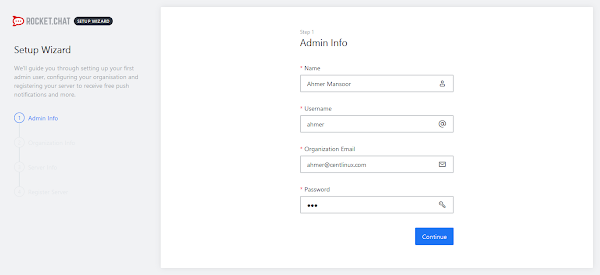
Provide Admin info and click on Continue.
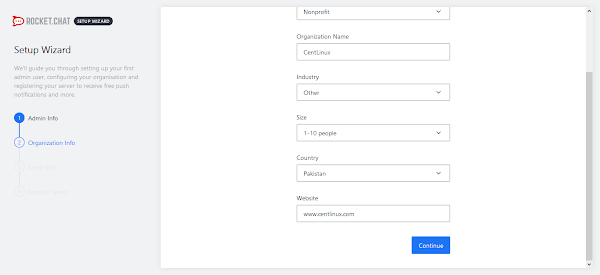
You need to provide the Organization info on this page. Click on Continue.
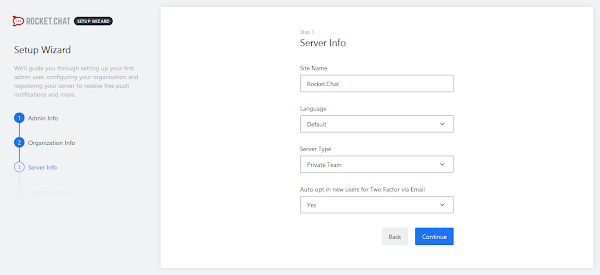
Provide the Server info and click on Continue.
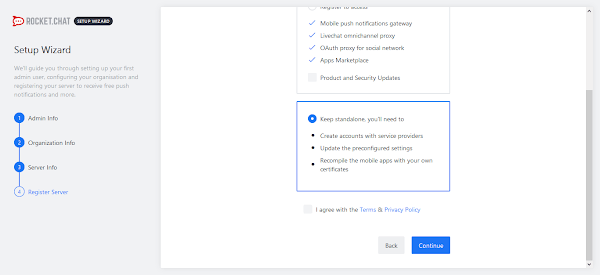
Register your RocketChat server online or keep it stand alone. Click on Continue.
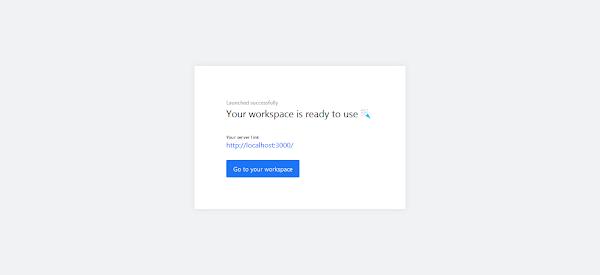
Your Rocket Chat workplace is ready to use now. Click on Go to workplace.
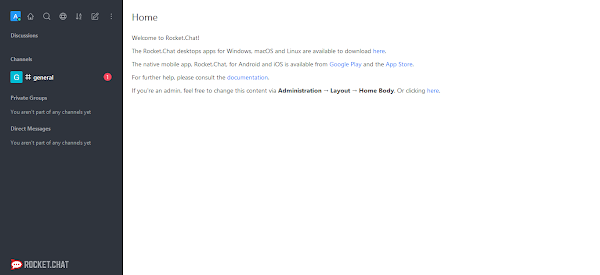
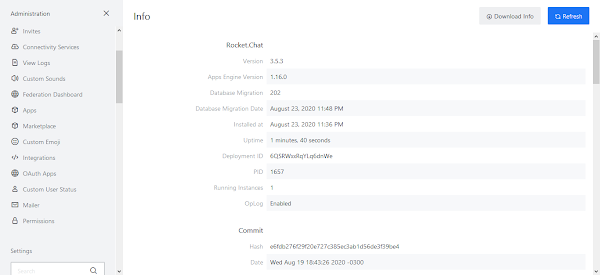
You are now at the Home page of Rocket Chat web interface. Click on Administration from the top-left toolbar.
Final Thoughts
Install RocketChat Server on CentOS 8 is a fantastic way to enhance your team’s communication and collaboration capabilities. With its robust features, customization options, and secure infrastructure, Rocket.Chat provides a versatile platform for both small teams and large enterprises.
Looking for a Linux server expert? I provide top-tier administration, performance tuning, and security solutions for your Linux systems. Explore my Freelancer profile for details!
Enhance your team’s productivity and communication with expert support today!
FAQs
Q1: Can RocketChat run on CentOS 8 with minimal hardware resources?
Yes, RocketChat can run on minimal hardware, but for better performance, at least 2GB RAM and a dual-core CPU are recommended.
Q2: Is it necessary to use MongoDB with RocketChat on CentOS 8?
Yes, RocketChat requires MongoDB as its database backend to store messages and user data.
Q3: Can I install RocketChat using Docker on CentOS 8?
Yes, Docker is supported and can simplify installation and updates on CentOS 8.
Q4: How do I secure RocketChat communications on CentOS 8?
You should enable HTTPS with an SSL certificate and configure firewall rules to protect your server.
Q5: Does RocketChat support LDAP or Active Directory integration on CentOS 8?
Yes, RocketChat has built-in options to integrate with LDAP/Active Directory for user authentication.
Recommended Courses
If you’re new to VoIP (Voice over Internet Protocol) and want to understand how it works, how to set it up, and how to use it for personal or business communication, the course “VoIP Systems for Beginners” by Dan Mill is a perfect starting point. This beginner-friendly course breaks down complex networking and VoIP concepts into simple, actionable lessons so you can start building your skills right away.
Whether you’re exploring VoIP for cost savings, flexibility, or to enhance your IT knowledge, this training will help you gain the confidence to work with modern communication systems. Enroll in the course here and take the first step toward mastering VoIP technology.
Disclaimer: This post contains affiliate links. If you purchase through these links, I may earn a small commission at no extra cost to you, which helps support this blog and keep the content free.






16 responses to “How to install RocketChat Server on CentOS 8”
Great as you always are
Thank you for the support.
How do you change to port 80 / 443 ?
There are many ways to do it, But I recommend to set a port forwarding by using firewalld.
Followed example from the same kernel and release.
My rocketchat service keeps failing.
Please discuss it with me on our Facebook page.
Hey. how to set up video calls with Jitsi. video call shows 404
sorry for my English
Your request has been noted down. We will work on Jitsi a.s.a.p.
Everything worked except when i got to starting Rocket Chat service. I had to do the following:
Change the path to new nodejs in the service config:
sudo nano /lib/systemd/system/rocketchat.service
In the line beginning with “ExecStart=” replace “/usr/local/bin/node” with “/usr/bin/node”
Thanks for sharing this.
Which I changed this directory it returned me these errors below:
rocketchat.service – The Rocket.Chat server
Loaded: loaded (/usr/lib/systemd/system/rocketchat.service; enabled; vendor preset: disabled)
Active: failed (Result: exit-code) since Fri 2022-04-01 10:00:58 -03; 4s ago
Process: 2035888 ExecStart=/usr/bin/node /opt/Rocket.Chat/main.js (code=exited, status=1/FAILURE)
Main PID: 2035888 (code=exited, status=1/FAILURE)
Apr 01 10:00:58 BNUGR03WEB02PROD.gruposelecionar.corp rocketchat[2035888]: at Module.Mp._compile (/opt/Rocket.Chat/programs/server/runtime.js:99:23)
Apr 01 10:00:58 BNUGR03WEB02PROD.gruposelecionar.corp rocketchat[2035888]: at Object.Module._extensions..js (node:internal/modules/cjs/loader:1157:10)
Apr 01 10:00:58 BNUGR03WEB02PROD.gruposelecionar.corp rocketchat[2035888]: at Module.load (node:internal/modules/cjs/loader:981:32)
Apr 01 10:00:58 BNUGR03WEB02PROD.gruposelecionar.corp rocketchat[2035888]: at Module.Mp.load (/opt/Rocket.Chat/programs/server/runtime.js:46:33)
Apr 01 10:00:58 BNUGR03WEB02PROD.gruposelecionar.corp rocketchat[2035888]: at Function.Module._load (node:internal/modules/cjs/loader:822:12)
Apr 01 10:00:58 BNUGR03WEB02PROD.gruposelecionar.corp rocketchat[2035888]: at Module.require (node:internal/modules/cjs/loader:1005:19)
Apr 01 10:00:58 BNUGR03WEB02PROD.gruposelecionar.corp rocketchat[2035888]: at require (node:internal/modules/cjs/helpers:102:18)
Apr 01 10:00:58 BNUGR03WEB02PROD.gruposelecionar.corp rocketchat[2035888]: at Object. (/opt/Rocket.Chat/programs/server/boot.js:2:15)
Apr 01 10:00:58 BNUGR03WEB02PROD.gruposelecionar.corp systemd[1]: rocketchat.service: Main process exited, code=exited, status=1/FAILURE
Apr 01 10:00:58 BNUGR03WEB02PROD.gruposelecionar.corp systemd[1]: rocketchat.service: Failed with result 'exit-code'.
Execute
# whereis node
to locate the location of nodejs binary file. then update this location accordingly in the rocketchat.service unit file.
First thanks!
I made the mentioned changes, updated Node and the error is now the one below:
rocketchat.service – The Rocket.Chat server
Loaded: error (Reason: Unit rocketchat.service failed to loaded properly: Invalid argument.)
Active: failed (Result: exit-code) since Mon 2022-04-04 09:30:59 -03; 50s ago
Main PID: 2423504 (code=exited, status=1/FAILURE)
…………………………………………… rocketchat[2423504]: at Module.load (node:internal/modules/cjs/loader:981:32)
…………………………………………… rocketchat[2423504]: at Module.Mp.load (/opt/Rocket.Chat/programs/server/runtime.js:46:33)
…………………………………………… rocketchat[2423504]: at Function.Module._load (node:internal/modules/cjs/loader:822:12)
…………………………………………… rocketchat[2423504]: at Module.require (node:internal/modules/cjs/loader:1005:19)
…………………………………………… rocketchat[2423504]: at require (node:internal/modules/cjs/helpers:102:18)
…………………………………………… rocketchat[2423504]: at Object. (/opt/Rocket.Chat/programs/server/boot.js:2:15)
…………………………………………… systemd[1]: rocketchat.service: Main process exited, code=exited, status=1/FAILURE
…………………………………………… systemd[1]: rocketchat.service: Failed with result 'exit-code'.
…………………………………………… systemd[1]: /usr/lib/systemd/system/rocketchat.service:15: Missing '='.
…………………………………………… systemd[1]: /usr/lib/systemd/system/rocketchat.service:15: Missing '='.
Have a look at last line of log. It says there is a missing '='. Please recheck rocketchat.service file for any syntax errors.
It doesn´t work here
# systemctl status rocketchat
● rocketchat.service – The Rocket.Chat server
Loaded: loaded (/usr/lib/systemd/system/rocketchat.service; enabled; vendor preset: disabled)
Active: failed (Result: exit-code) since Tue 2022-10-11 11:38:30 -03; 1min 11s ago
Process: 1420 ExecStart=/usr/local/bin/node /opt/Rocket.Chat/main.js (code=exited, status=1/FAILURE)
Main PID: 1420 (code=exited, status=1/FAILURE)
out 11 11:38:30 SRVSESAPI-22 systemd[1]: Started The Rocket.Chat server.
out 11 11:38:30 SRVSESAPI-22 rocketchat[1420]: Meteor requires Node v14.0.0 or later.
out 11 11:38:30 SRVSESAPI-22 systemd[1]: rocketchat.service: Main process exited, code=exited, status=1/FAILURE
out 11 11:38:30 SRVSESAPI-22 systemd[1]: rocketchat.service: Failed with result 'exit-code'.
It looks like you are installing a later version of Rocket Chat. Try installing Node.js 14 or later to resolve this problem.